









Bugün C# ile EXE boyutunu TB bile yapmamızı sağlayan bir File Pumper kodlayacağız.
File Pumper Nedir ?
File Pumper kullandığınız malware yazılım 10 15 kb olan boyutunu 10 20 GB bazen daha fazla bir boyuta çıkartmanızı sağlar.
Koda geçelim
Kütüphanelerimiz;
Tasarım bileşenlerini alalım;
Dosya Seçme İşlemi;
OpenFileDialog ile EXE seçmek için penceremizi açıyoruz.
Seçilen dosyayı txtDosyaYoluna aktarıyoruz.
Birim seçme işlemi;
Dosya yolunu kontrol ediyoruz
Kullanıcı tarafından girilen şişirme boyutu ve birim alınır ConvertToBytes fonksiyonu ile hedef boyut byte cinsine çeviriyoruz
Boyut çevirme işlevi;
Switch bloğu ile her birimin byte karşılıklarını hesaplıyoruz ve dönüşüm sağlıyoruz.
Şişirme Fonksiyonu;
Bu fonksiyon dosyanın mevcut boyutunu ve hdef boyut arasındaki farkı hesaplar
Fark kadar rastgele byte verisi eklenir ve dosya şişirilir
Sonuç olarak şişirilmiş dosya byte array olarak döndürülür
Kodun Tamamı;
Designer Kodu;
Test Edelim;
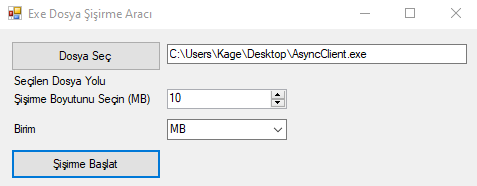
Dosyamızı seçtik şişirip masaüstüne kaydedelim;
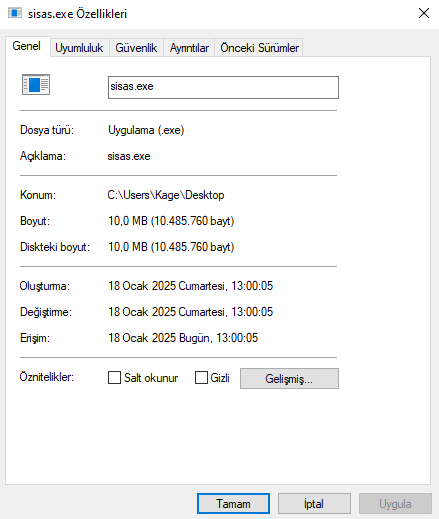
10 MB olarak belirlediğimiz gibi olmuş boyutu şimdi çalıştırıp yapısının bozulup bozulmadığına bakalım;
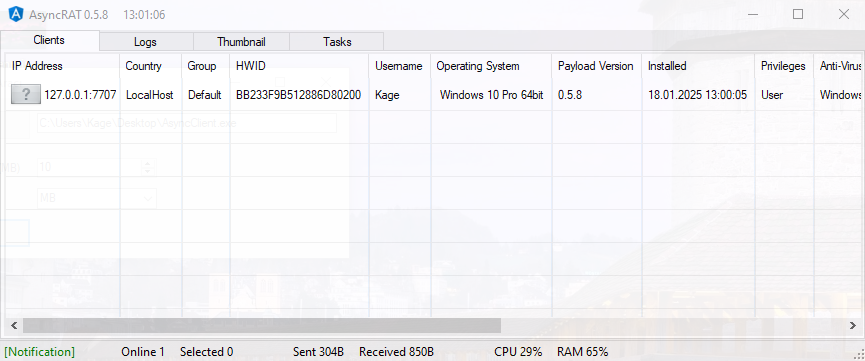
Gördüğünüz gibi yapısında bir sorun yok sorunsuz çalışıyor konumuz bu kadardı İYİ FORUMLAR

File Pumper Nedir ?
File Pumper kullandığınız malware yazılım 10 15 kb olan boyutunu 10 20 GB bazen daha fazla bir boyuta çıkartmanızı sağlar.
Koda geçelim
Kütüphanelerimiz;
C#:
using System;
using System.IO;
using System.Windows.Forms;
Tasarım bileşenlerini alalım;
C#:
    public partial class AnaForm : Form
    {
        public AnaForm()
        {
            InitializeComponent();
        }
Dosya Seçme İşlemi;
C#:
private void btnDosyaSec_Click(object sender, EventArgs e)
{
    OpenFileDialog dosyaSecDialog = new OpenFileDialog
    {
        Filter = "Exe Seçin (*.exe)|*.exe",
        Title = "Dosya Seç"
    };

    if (dosyaSecDialog.ShowDialog() == DialogResult.OK)
    {
        txtDosyaYolu.Text = dosyaSecDialog.FileName;
    }
}
OpenFileDialog ile EXE seçmek için penceremizi açıyoruz.
Seçilen dosyayı txtDosyaYoluna aktarıyoruz.
Birim seçme işlemi;
C#:
private void btnSisirmeBaslat_Click(object sender, EventArgs e)
{
    string dosyaYolu = txtDosyaYolu.Text;

    if (string.IsNullOrEmpty(dosyaYolu) || !File.Exists(dosyaYolu))
    {
        MessageBox.Show("Lütfen geçerli bir dosya seçin.", "Hata", MessageBoxButtons.OK, MessageBoxIcon.Error);
        return;
    }

    int sisirmeBoyutu = (int)numBoyut.Value;
    string birim = cmbBirim.SelectedItem.ToString();

    int hedefBoyut = ConvertToBytes(sisirmeBoyutu, birim);

    byte[] dosyaBytes = File.ReadAllBytes(dosyaYolu);

    byte[] sisirilmisDosya = DosyaSisirme(dosyaBytes, hedefBoyut);
}
Dosya yolunu kontrol ediyoruz
Kullanıcı tarafından girilen şişirme boyutu ve birim alınır ConvertToBytes fonksiyonu ile hedef boyut byte cinsine çeviriyoruz
Boyut çevirme işlevi;
C#:
private int ConvertToBytes(int boyut, string birim)
{
    int byteBoyutu = 0;

    switch (birim.ToUpper())
    {
        case "MB":
            byteBoyutu = boyut * 1024 * 1024;
            break;
        case "GB":
            byteBoyutu = boyut * 1024 * 1024 * 1024;
            break;
        case "TB":
            byteBoyutu = boyut * 1024 * 1024 * 1024 * 1024;
            break;
        default:
            MessageBox.Show("Geçersiz birim seçildi.", "Hata", MessageBoxButtons.OK, MessageBoxIcon.Error);
            break;
    }

    return byteBoyutu;
}
Switch bloğu ile her birimin byte karşılıklarını hesaplıyoruz ve dönüşüm sağlıyoruz.
Şişirme Fonksiyonu;
C#:
private byte[] DosyaSisirme(byte[] dosyaBytes, int hedefBoyut)
{
    int mevcutBoyut = dosyaBytes.Length;


    int eklenmesiGerekenBoyut = hedefBoyut - mevcutBoyut;

    if (eklenmesiGerekenBoyut <= 0)
    {
        MessageBox.Show("Dosya zaten hedef boyuttan büyük veya eşit.", "Hata", MessageBoxButtons.OK, MessageBoxIcon.Error);
        return dosyaBytes;
    }

    byte[] eklenenVeri = new byte[eklenmesiGerekenBoyut];
    new Random().NextBytes(eklenenVeri);

    byte[] sisirilmisDosya = new byte[hedefBoyut];
    Array.Copy(dosyaBytes, sisirilmisDosya, dosyaBytes.Length);
    Array.Copy(eklenenVeri, 0, sisirilmisDosya, dosyaBytes.Length, eklenenVeri.Length);

    return sisirilmisDosya;
}
Bu fonksiyon dosyanın mevcut boyutunu ve hdef boyut arasındaki farkı hesaplar
Fark kadar rastgele byte verisi eklenir ve dosya şişirilir
Sonuç olarak şişirilmiş dosya byte array olarak döndürülür
Kodun Tamamı;
C#:
using System;
using System.IO;
using System.Windows.Forms;

namespace ExeDosyaSisirme
{
    public partial class Form1 : Form
    {
        public Form1()
        {
            InitializeComponent();
        }


        private void btnDosyaSec_Click(object sender, EventArgs e)
        {
            OpenFileDialog dosyaSecDialog = new OpenFileDialog
            {
                Filter = "Yürütülebilir Dosyalar (*.exe)|*.exe",
                Title = "Dosya Seç"
            };

            if (dosyaSecDialog.ShowDialog() == DialogResult.OK)
            {
                txtDosyaYolu.Text = dosyaSecDialog.FileName;
            }
        }


        private void btnSisirmeBaslat_Click(object sender, EventArgs e)
        {
            string dosyaYolu = txtDosyaYolu.Text;


            if (string.IsNullOrEmpty(dosyaYolu) || !File.Exists(dosyaYolu))
            {
                MessageBox.Show("Lütfen geçerli bir dosya seçin.", "Hata", MessageBoxButtons.OK, MessageBoxIcon.Error);
                return;
            }


            int sisirmeBoyutu = (int)numBoyut.Value;
            string birim = cmbBirim.SelectedItem.ToString();

            int hedefBoyut = ConvertToBytes(sisirmeBoyutu, birim);

            byte[] dosyaBytes = File.ReadAllBytes(dosyaYolu);

            byte[] sisirilmisDosya = DosyaSisirme(dosyaBytes, hedefBoyut);

            SaveFileDialog saveFileDialog = new SaveFileDialog();
            saveFileDialog.Filter = "Yürütülebilir Dosyalar (*.exe)|*.exe";
            saveFileDialog.Title = "Şişirilmiş Dosyayı Kaydet";

            if (saveFileDialog.ShowDialog() == DialogResult.OK)
            {
                File.WriteAllBytes(saveFileDialog.FileName, sisirilmisDosya);
                MessageBox.Show("Dosya başarıyla şişirildi ve kaydedildi.", "Başarılı", MessageBoxButtons.OK, MessageBoxIcon.Information);
            }
        }


        private int ConvertToBytes(int boyut, string birim)
        {
            int byteBoyutu = 0;

            switch (birim.ToUpper())
            {
                case "MB":
                    byteBoyutu = boyut * 1024 * 1024;
                    break;
                case "GB":
                    byteBoyutu = boyut * 1024 * 1024 * 1024;
                    break;
                case "TB":
                    byteBoyutu = boyut * 1024 * 1024 * 1024 * 1024;
                    break;
                default:
                    MessageBox.Show("Geçersiz birim seçildi.", "Hata", MessageBoxButtons.OK, MessageBoxIcon.Error);
                    break;
            }

            return byteBoyutu;
        }


        private byte[] DosyaSisirme(byte[] dosyaBytes, int hedefBoyut)
        {
            int mevcutBoyut = dosyaBytes.Length;


            int eklenmesiGerekenBoyut = hedefBoyut - mevcutBoyut;

            if (eklenmesiGerekenBoyut <= 0)
            {
                MessageBox.Show("Dosya zaten hedef boyuttan büyük veya eşit.", "Hata", MessageBoxButtons.OK, MessageBoxIcon.Error);
                return dosyaBytes;
            }

            byte[] eklenenVeri = new byte[eklenmesiGerekenBoyut];
            new Random().NextBytes(eklenenVeri);

            byte[] sisirilmisDosya = new byte[hedefBoyut];
            Array.Copy(dosyaBytes, sisirilmisDosya, dosyaBytes.Length);
            Array.Copy(eklenenVeri, 0, sisirilmisDosya, dosyaBytes.Length, eklenenVeri.Length);

            return sisirilmisDosya;
        }
    }
}
Designer Kodu;
C#:
namespace ExeDosyaSisirme
{
    partial class Form1
    {
        private System.ComponentModel.IContainer components = null;

        protected override void Dispose(bool disposing)
        {
            if (disposing && (components != null))
            {
                components.Dispose();
            }
            base.Dispose(disposing);
        }

        #region Windows Form Designer generated code

        private void InitializeComponent()
        {
            this.btnDosyaSec = new System.Windows.Forms.Button();
            this.txtDosyaYolu = new System.Windows.Forms.TextBox();
            this.btnSisirmeBaslat = new System.Windows.Forms.Button();
            this.numBoyut = new System.Windows.Forms.NumericUpDown();
            this.cmbBirim = new System.Windows.Forms.ComboBox();
            this.label1 = new System.Windows.Forms.Label();
            this.label2 = new System.Windows.Forms.Label();
            this.label3 = new System.Windows.Forms.Label();
            ((System.ComponentModel.ISupportInitialize)(this.numBoyut)).BeginInit();
            this.SuspendLayout();

            this.btnDosyaSec.Location = new System.Drawing.Point(12, 12);
            this.btnDosyaSec.Name = "btnDosyaSec";
            this.btnDosyaSec.Size = new System.Drawing.Size(150, 30);
            this.btnDosyaSec.TabIndex = 0;
            this.btnDosyaSec.Text = "Dosya Seç";
            this.btnDosyaSec.UseVisualStyleBackColor = true;
            this.btnDosyaSec.Click += new System.EventHandler(this.btnDosyaSec_Click);

            this.txtDosyaYolu.Location = new System.Drawing.Point(168, 15);
            this.txtDosyaYolu.Name = "txtDosyaYolu";
            this.txtDosyaYolu.Size = new System.Drawing.Size(300, 20);
            this.txtDosyaYolu.TabIndex = 1;

            this.btnSisirmeBaslat.Location = new System.Drawing.Point(12, 120);
            this.btnSisirmeBaslat.Name = "btnSisirmeBaslat";
            this.btnSisirmeBaslat.Size = new System.Drawing.Size(150, 30);
            this.btnSisirmeBaslat.TabIndex = 2;
            this.btnSisirmeBaslat.Text = "Şişirme Başlat";
            this.btnSisirmeBaslat.UseVisualStyleBackColor = true;
            this.btnSisirmeBaslat.Click += new System.EventHandler(this.btnSisirmeBaslat_Click);

            this.numBoyut.Location = new System.Drawing.Point(168, 60);
            this.numBoyut.Name = "numBoyut";
            this.numBoyut.Size = new System.Drawing.Size(120, 20);
            this.numBoyut.TabIndex = 3;
            this.numBoyut.Value = new decimal(new int[] {
            10,
            0,
            0,
            0});

            this.cmbBirim.FormattingEnabled = true;
            this.cmbBirim.Items.AddRange(new object[] {
            "MB",
            "GB",
            "TB"});
            this.cmbBirim.Location = new System.Drawing.Point(168, 90);
            this.cmbBirim.Name = "cmbBirim";
            this.cmbBirim.Size = new System.Drawing.Size(120, 21);
            this.cmbBirim.TabIndex = 4;

            this.label1.AutoSize = true;
            this.label1.Location = new System.Drawing.Point(12, 63);
            this.label1.Name = "label1";
            this.label1.Size = new System.Drawing.Size(143, 13);
            this.label1.TabIndex = 5;
            this.label1.Text = "Şişirme Boyutunu Seçin (MB)";

            this.label2.AutoSize = true;
            this.label2.Location = new System.Drawing.Point(12, 93);
            this.label2.Name = "label2";
            this.label2.Size = new System.Drawing.Size(29, 13);
            this.label2.TabIndex = 6;
            this.label2.Text = "Birim";

            this.label3.AutoSize = true;
            this.label3.Location = new System.Drawing.Point(12, 45);
            this.label3.Name = "label3";
            this.label3.Size = new System.Drawing.Size(99, 13);
            this.label3.TabIndex = 7;
            this.label3.Text = "Seçilen Dosya Yolu";

            this.ClientSize = new System.Drawing.Size(480, 160);
            this.Controls.Add(this.label3);
            this.Controls.Add(this.label2);
            this.Controls.Add(this.label1);
            this.Controls.Add(this.cmbBirim);
            this.Controls.Add(this.numBoyut);
            this.Controls.Add(this.btnSisirmeBaslat);
            this.Controls.Add(this.txtDosyaYolu);
            this.Controls.Add(this.btnDosyaSec);
            this.Name = "Form1";
            this.Text = "Exe Dosya Şişirme Aracı";
            ((System.ComponentModel.ISupportInitialize)(this.numBoyut)).EndInit();
            this.ResumeLayout(false);
            this.PerformLayout();

        }

        #endregion

        private System.Windows.Forms.Button btnDosyaSec;
        private System.Windows.Forms.TextBox txtDosyaYolu;
        private System.Windows.Forms.Button btnSisirmeBaslat;
        private System.Windows.Forms.NumericUpDown numBoyut;
        private System.Windows.Forms.ComboBox cmbBirim;
        private System.Windows.Forms.Label label1;
        private System.Windows.Forms.Label label2;
        private System.Windows.Forms.Label label3;
    }
}
Test Edelim;
Dosyamızı seçtik şişirip masaüstüne kaydedelim;
10 MB olarak belirlediğimiz gibi olmuş boyutu şimdi çalıştırıp yapısının bozulup bozulmadığına bakalım;
Gördüğünüz gibi yapısında bir sorun yok sorunsuz çalışıyor konumuz bu kadardı İYİ FORUMLAR
Son düzenleme:








 örnek veriyorum bir videoyunun byte değerlerini 141 exe dosyasına bölün.








 bozmadan da ekleriz gülüm istersen bir tane yapıp vereyim MD5 checksum da ekleyelim indirirken bozuldu yalanıda tutmaz.

