





Herkese Merhabalar!
Uzun süredir üzerinde çalıştığım bir konuydu bu konu. Yani şöyle ki bir kod bilirkişisi C# programlama dilinin olmazsa olmazlarından birisi olan NetFrameWork yapısını kullanmadan bazı nesneler oluşturabilir miydi? Üstelik Windows API kullanarak... Geçmişte benzer nesneler kullandığımı hatırlayınca Form oluşturabildiğini keşfettim.



Merhabalar bugün sizlere GUI nesnesi olan OpenFileDialog aracını Visual Studio Form kullanmadan konsol uygulamalarında nasıl kullanılır onu göstereceğim & aynı zamanda API kullanarak bir web sitesine görsel yüklemeyi göreceğiz. Bu konuda aslında 2 farklı kaynaktan yararlandım konu altında belirteceğim.

- Maveraün Nehr
- Cevaplar: 13
- Forum: C# j# vb.net (.NET dilleri)

Üzülerek bahsetmekteyim uzun süren araştırmalarımda sürekli olarak bir form ögesi tanındığı için & bu tarz bir oluşum istemediğimden yapay zeka yardımı ve yukarıdaki makaleden de yararlandığım sabit değişkeni kaynakları üzerinden bir kod dizini oluşturdum ardından sizlere sonuçları paylaşmak istedim. Kodlarımıza geçelim...

using System;using System.Runtime.InteropServices;using System.Text;class Program verisi altına tanımlanan Windows API + Sabitleri
C#:
// User32.dll fonksiyonları
[DllImport("user32.dll", SetLastError = true)]
static extern ushort RegisterClassEx(ref WNDCLASSEX lpwcx);

[DllImport("user32.dll", SetLastError = true)]
static extern IntPtr CreateWindowEx(
    uint dwExStyle,
    string lpClassName,
    string lpWindowName,
    uint dwStyle,
    int x, int y,
    int nWidth, int nHeight,
    IntPtr hWndParent,
    IntPtr hMenu,
    IntPtr hInstance,
    IntPtr lpParam);

[DllImport("user32.dll")]
static extern bool ShowWindow(IntPtr hWnd, int nCmdShow);

[DllImport("user32.dll")]
static extern bool UpdateWindow(IntPtr hWnd);

[DllImport("user32.dll")]
static extern int GetMessage(out MSG lpMsg, IntPtr hWnd, uint wMsgFilterMin, uint wMsgFilterMax);

[DllImport("user32.dll")]
static extern bool TranslateMessage(ref MSG lpMsg);

[DllImport("user32.dll")]
static extern IntPtr DispatchMessage(ref MSG lpMsg);

[DllImport("user32.dll")]
static extern IntPtr DefWindowProc(IntPtr hWnd, uint msg, IntPtr wParam, IntPtr lParam);

[DllImport("user32.dll")]
static extern void PostQuitMessage(int nExitCode);

[DllImport("user32.dll")]
static extern int MessageBox(IntPtr hWnd, string text, string caption, uint type);

[DllImport("user32.dll")]
static extern int SendMessage(IntPtr hWnd, uint Msg, IntPtr wParam, StringBuilder lParam);

[DllImport("user32.dll")]
static extern IntPtr GetDlgItem(IntPtr hDlg, int nIDDlgItem);

// Kernel32.dll fonksiyonları
[DllImport("kernel32.dll")]
static extern IntPtr GetModuleHandle(string lpModuleName);

[DllImport("kernel32.dll")]
static extern IntPtr LoadCursor(IntPtr hInstance, int lpCursorName);

// Sabitler
const uint WS_OVERLAPPEDWINDOW = 0x00CF0000;
const uint WS_VISIBLE = 0x10000000;
const uint WS_CHILD = 0x40000000;
const uint WS_BORDER = 0x00800000;
const uint BS_PUSHBUTTON = 0x00000000;
const uint ES_LEFT = 0x00000000;
const uint SS_LEFT = 0x00000000;
const int SW_SHOWNORMAL = 1;
const uint WM_DESTROY = 0x0002;
const uint WM_CLOSE = 0x0010;
const uint WM_COMMAND = 0x0111;
const uint WM_GETTEXT = 0x000D;
const int IDC_ARROW = 32512;
const uint MB_OK = 0x00000000;
const int BUTTON_ID = 1001;
const int TEXTBOX_ID = 1002;
const int LABEL_ID = 1003;

// Yapılar
[StructLayout(LayoutKind.Sequential)]
struct WNDCLASSEX
{
    public uint cbSize;
    public uint style;
    public WndProcDelegate lpfnWndProc;
    public int cbClsExtra;
    public int cbWndExtra;
    public IntPtr hInstance;
    public IntPtr hIcon;
    public IntPtr hCursor;
    public IntPtr hbrBackground;
    public string lpszMenuName;
    public string lpszClassName;
    public IntPtr hIconSm;
}

[StructLayout(LayoutKind.Sequential)]
struct MSG
{
    public IntPtr hwnd;
    public uint message;
    public IntPtr wParam;
    public IntPtr lParam;
    public uint time;
    public POINT pt;
}

[StructLayout(LayoutKind.Sequential)]
struct POINT
{
    public int x;
    public int y;
}

// Window Procedure delegate
delegate IntPtr WndProcDelegate(IntPtr hWnd, uint msg, IntPtr wParam, IntPtr lParam);

static IntPtr mainWindow; // Ana pencere handle'ı
static IntPtr textBoxHandle; // TextBox handle'ı
static IntPtr labelHandle; // Label handle'ı
Gelelim main verisi altına gireceğimiz Textbox, label, buton oluşturma kodlarına
C#:
 // Window Class tanımlama
 WNDCLASSEX wndClass = new WNDCLASSEX();
 wndClass.cbSize = (uint)Marshal.SizeOf(wndClass);
 wndClass.style = 0;
 wndClass.lpfnWndProc = WindowProc;
 wndClass.cbClsExtra = 0;
 wndClass.cbWndExtra = 0;
 wndClass.hInstance = GetModuleHandle(null);
 wndClass.hIcon = IntPtr.Zero;
// wndClass.hCursor = LoadCursor(IDC_ARROW);
 wndClass.hbrBackground = (IntPtr)(5 + 1); // COLOR_WINDOW
 wndClass.lpszMenuName = null;
 wndClass.lpszClassName = "MyWindowClass";
 wndClass.hIconSm = IntPtr.Zero;

 // Window Class'ı kaydetme
 ushort classAtom = RegisterClassEx(ref wndClass);
 if (classAtom == 0)
 {
     Console.WriteLine("RegisterClassEx failed!");
     return;
 }

 // Pencere oluşturma
 IntPtr hWnd = CreateWindowEx(
     0,                          // dwExStyle
     "MyWindowClass",            // lpClassName
     "Windows API Form - C#",    // lpWindowName
     WS_OVERLAPPEDWINDOW | WS_VISIBLE, // dwStyle
     100, 100,                   // x, y
     800, 600,                   // width, height
     IntPtr.Zero,                // hWndParent
     IntPtr.Zero,                // hMenu
     GetModuleHandle(null),      // hInstance
     IntPtr.Zero);               // lpParam

 if (hWnd == IntPtr.Zero)
 {
     Console.WriteLine("CreateWindowEx failed!");
     return;
 }

 // Ana pencere handle'ını saklıyoruz
 mainWindow = hWnd;

 // Label oluşturma
 IntPtr hLabel = CreateWindowEx(
     0,                          // dwExStyle
     "STATIC",                   // lpClassName (önceden tanımlanmış)
     "Adınızı girin:",           // lpWindowName (label metni)
     WS_CHILD | WS_VISIBLE | SS_LEFT, // dwStyle
     50, 20,                     // x, y
     150, 25,                    // width, height
     hWnd,                       // hWndParent (ana pencere)
     (IntPtr)LABEL_ID,           // hMenu (label ID'si)
     GetModuleHandle(null),      // hInstance
     IntPtr.Zero);               // lpParam

 if (hLabel == IntPtr.Zero)
 {
     Console.WriteLine("Label oluşturulamadı!");
 }
 else
 {
     labelHandle = hLabel;
 }

 // TextBox oluşturma
 IntPtr hTextBox = CreateWindowEx(
     0,                          // dwExStyle
     "EDIT",                     // lpClassName (önceden tanımlanmış)
     "",                         // lpWindowName (başlangıç metni)
     WS_CHILD | WS_VISIBLE | WS_BORDER | ES_LEFT, // dwStyle
     50, 50,                     // x, y
     300, 25,                    // width, height
     hWnd,                       // hWndParent (ana pencere)
     (IntPtr)TEXTBOX_ID,         // hMenu (textbox ID'si)
     GetModuleHandle(null),      // hInstance
     IntPtr.Zero);               // lpParam

 if (hTextBox == IntPtr.Zero)
 {
     Console.WriteLine("TextBox oluşturulamadı!");
 }
 else
 {
     textBoxHandle = hTextBox;
 }

 // Buton oluşturma
 IntPtr hButton = CreateWindowEx(
     0,                          // dwExStyle
     "BUTTON",                   // lpClassName (önceden tanımlanmış)
     "Merhaba De!",              // lpWindowName (buton metni)
     WS_CHILD | WS_VISIBLE | BS_PUSHBUTTON, // dwStyle
     50, 90,                     // x, y (textbox'ın altına yerleştirdik)
     200, 30,                    // width, height
     hWnd,                       // hWndParent (ana pencere)
     (IntPtr)BUTTON_ID,          // hMenu (buton ID'si)
     GetModuleHandle(null),      // hInstance
     IntPtr.Zero);               // lpParam

 if (hButton == IntPtr.Zero)
 {
     Console.WriteLine("Button oluşturulamadı!");
 }

 // Pencereyi gösterme
 ShowWindow(hWnd, SW_SHOWNORMAL);
 UpdateWindow(hWnd);

 // Mesaj döngüsü
 MSG msg;
 while (GetMessage(out msg, IntPtr.Zero, 0, 0) > 0)
 {
     TranslateMessage(ref msg);
     DispatchMessage(ref msg);
 }
Son kısımda ise mesaj kutusu göstermek için gireceğimiz kodu verelim.
C#:
 static IntPtr WindowProc(IntPtr hWnd, uint msg, IntPtr wParam, IntPtr lParam)
 {
     switch (msg)
     {
         case WM_COMMAND:
             // Buton tıklamasını kontrol et
             int controlId = wParam.ToInt32() & 0xFFFF; // Alt 16 bit kontrolün ID'si
             int notificationCode = (wParam.ToInt32() >> 16) & 0xFFFF; // Üst 16 bit bildirim kodu

             if (controlId == BUTTON_ID)
             {
                 // TextBox'tan metni al
                 StringBuilder textBuffer = new StringBuilder(256);
                 SendMessage(textBoxHandle, WM_GETTEXT, (IntPtr)textBuffer.Capacity, textBuffer);

                 string inputText = textBuffer.ToString();

                 // Eğer TextBox boşsa varsayılan mesaj göster
                 if (string.IsNullOrEmpty(inputText))
                 {
                     MessageBox(hWnd, "Merhaba Dünya!", "Windows API Mesajı", MB_OK);
                 }
                 else
                 {
                     // TextBox'taki metinle kişiselleştirilmiş mesaj göster
                     MessageBox(hWnd, $"Merhaba {inputText}!", "Windows API Mesajı", MB_OK);
                 }
             }
             return IntPtr.Zero;

         case WM_CLOSE:
             PostQuitMessage(0);
             return IntPtr.Zero;

         case WM_DESTROY:
             PostQuitMessage(0);
             return IntPtr.Zero;

         default:
             return DefWindowProc(hWnd, msg, wParam, lParam);
     }
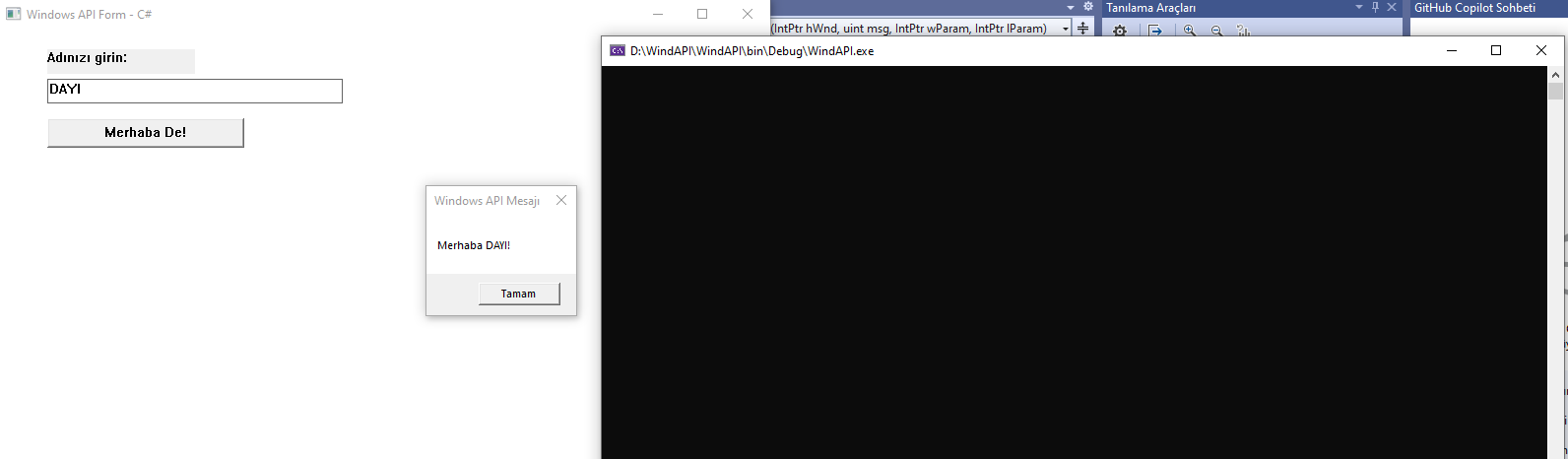
Ardından Derleyelim Bakalım Sonuçlar Nasıl?
[ SON ]
[ SON ]