






JAVA GUI ile Hesap Makinesi (Kodlar,İndir)
Bu konuda hesap makinesinin WindowBuilder ile yazılmış source codelarını yazacağım, böylece Java'da GUI ye giriş yapmış olacağız.
İndirme Linki:
Dosya.tc - cretsiz, Hzl ve Kolay Dosya Paylam

ilk classımız Hesaplar. Bu clasın içinde hesap makinesi kodlarımızı yazıyoruz:
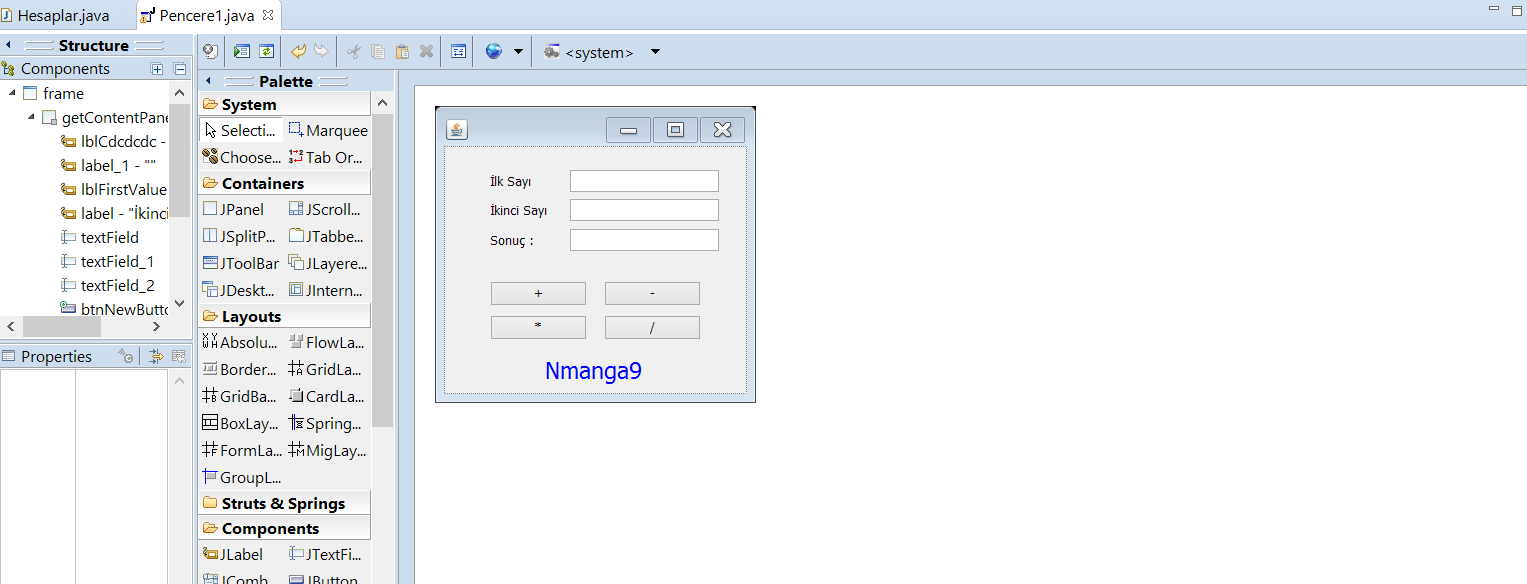
Diğer classımızın adı Pencere1, bunun içinde java eclipse windowbuilder ile GUI sayfamızı açtığımızda otomatik bazı kodlar yazılıyor, bunlarıda düzenleyerek Hesaplama clasındaki özellikleri çağırıyoruz, bunlarda kodlar:
Eğer bu iki classı olduğu gibi oluşturup açarsanız, hesap makinesi çalışacaktır.
Kodlar uzun ve zor gözüksede aslında çok zor değil çünkü windowbuilderla resim gibi çiziyoruz sonra üzerine kodları yazıyoruz:
Eğer sorunuz varsa anlatabilirim hangi methodun nasıl çalıştığını kolay gelsin.
İndirme Linki:
Dosya.tc - cretsiz, Hzl ve Kolay Dosya Paylam
Eğer dosyayı çalıştıramıyorsanız ozaman bilgisayarınızdaki java versiyonunuz eski, onu aramalarda configure java'ya basıp update kısmından son güncellemesini yapın, çalışacaktır.
Bu konuda hesap makinesinin WindowBuilder ile yazılmış source codelarını yazacağım, böylece Java'da GUI ye giriş yapmış olacağız.
İndirme Linki:
Dosya.tc - cretsiz, Hzl ve Kolay Dosya Paylam
ilk classımız Hesaplar. Bu clasın içinde hesap makinesi kodlarımızı yazıyoruz:
Kod:
public class Hesaplar {
	private static double x;
	private static double y;

	public Hesaplar (double x, double y) {
		Hesaplar.setX(x);
		Hesaplar.setY(y);
	}

	public static double sum() {
		return getX() + getY();
	}

	public static double miles() {
		return getX() - getY();
	}

	public static double times() {
		return getX() * getY();
	}

	public static double divide() {
		return getX() / getY();
	}

	public static double getX() {
		return x;
	}

	public static double getY() {
		return y;
	}

	public static **** setX(double x) {
		Hesaplar.x = x;
	}

	public static **** setY(double y) {
		Hesaplar.y = y;
	}
}
Diğer classımızın adı Pencere1, bunun içinde java eclipse windowbuilder ile GUI sayfamızı açtığımızda otomatik bazı kodlar yazılıyor, bunlarıda düzenleyerek Hesaplama clasındaki özellikleri çağırıyoruz, bunlarda kodlar:
Kod:
import java.awt.EventQueue;
import javax.swing.JFrame;
import javax.swing.JButton;
import javax.swing.JLabel;
import java.awt.Color;
import java.awt.event.ActionListener;
import java.awt.event.ActionEvent;
import javax.swing.JTextField;
import java.awt.Font;
import javax.swing.SwingConstants;

public class Pencere1 {

	private JFrame frame;
	private JTextField textField;
	private JTextField textField_1;
	private JTextField textField_2;

	/**
	 * Launch the application.
	 */
	public static **** main(String[] args) {
		EventQueue.invokeLater(new Runnable() {
			public **** run() {
				try {
					Pencere1 window = new Pencere1();
					window.frame.setVisible(true);
				} catch (Exception e) {
					e.printStackTrace();
				}
			}
		});
	}

	/**
	 * Create the application.
	 */
	public Pencere1() {
		initialize();
	}

	/**
	 * Initialize the contents of the frame.
	 */
	private **** initialize() {
		frame = new JFrame();
		frame.setBounds(100, 100, 321, 297);
		frame.setDefaultCloseOperation(JFrame.EXIT_ON_CLOSE);
		frame.getContentPane().setLayout(null);

		JLabel lblCdcdcdc = new JLabel("");
		lblCdcdcdc.setBounds(0, 0, 0, 0);
		frame.getContentPane().add(lblCdcdcdc);

		JLabel label_1 = new JLabel("");
		label_1.setBounds(0, 22, 318, -22);
		frame.getContentPane().add(label_1);

		JLabel lblFirstValue = new JLabel("\u0130lk Say\u0131");
		lblFirstValue.setBounds(46, 27, 80, 16);
		frame.getContentPane().add(lblFirstValue);

		JLabel label = new JLabel("\u0130kinci Say\u0131");
		label.setBounds(46, 56, 80, 16);
		frame.getContentPane().add(label);

		textField = new JTextField();
		textField.setBounds(126, 24, 149, 22);
		frame.getContentPane().add(textField);
		textField.setColumns(10);

		textField_1 = new JTextField();
		textField_1.setColumns(10);
		textField_1.setBounds(126, 53, 149, 22);
		frame.getContentPane().add(textField_1);

		textField_2 = new JTextField();
		textField_2.setColumns(10);
		textField_2.setBounds(126, 83, 149, 22);
		frame.getContentPane().add(textField_2);

		JButton btnNewButton = new JButton("+");
		btnNewButton.addActionListener(new ActionListener() {
			public **** actionPerformed(ActionEvent arg0) {

				int x = Integer.parseInt(textField.getText());
				Hesaplar.setX(x);

				int y = Integer.parseInt(textField_1.getText());
				Hesaplar.setY(y);

				double z = Hesaplar.sum();

				textField_2.setText(z + "");
			}
		});

		btnNewButton.setBounds(46, 135, 97, 25);
		frame.getContentPane().add(btnNewButton);

		JButton btnNewButton_1 = new JButton("-");
		btnNewButton_1.addActionListener(new ActionListener() {
			public **** actionPerformed(ActionEvent arg0) {

				int x = Integer.parseInt(textField.getText());
				Hesaplar.setX(x);

				int y = Integer.parseInt(textField_1.getText());
				Hesaplar.setY(y);

				double z = Hesaplar.miles();

				textField_2.setText(z + "");
			}
		});

		btnNewButton_1.setBounds(160, 135, 97, 25);
		frame.getContentPane().add(btnNewButton_1);

		JLabel label_2 = new JLabel("Sonu\u00E7 : ");
		label_2.setBounds(46, 86, 80, 16);
		frame.getContentPane().add(label_2);

		JButton button = new JButton("*");
		button.addActionListener(new ActionListener() {
			public **** actionPerformed(ActionEvent e) {
				int x = Integer.parseInt(textField.getText());
				Hesaplar.setX(x);

				int y = Integer.parseInt(textField_1.getText());
				Hesaplar.setY(y);

				double z = Hesaplar.times();

				textField_2.setText(z + "");
			}
		});
		button.setBounds(46, 169, 97, 25);
		frame.getContentPane().add(button);

		JButton button_1 = new JButton("/");
		button_1.addActionListener(new ActionListener() {
			public **** actionPerformed(ActionEvent e) {
				int x = Integer.parseInt(textField.getText());
				Hesaplar.setX(x);

				int y = Integer.parseInt(textField_1.getText());
				Hesaplar.setY(y);

				double z = Hesaplar.divide();

				textField_2.setText(z + "");
			}
		});
		button_1.setBounds(160, 169, 97, 25);
		frame.getContentPane().add(button_1);

		JLabel lblNewLabel = new JLabel("Nmanga9");
		lblNewLabel.setHorizontalAlignment(SwingConstants.CENTER);
		lblNewLabel.setFont(new Font("Tahoma", Font.PLAIN, 23));
		lblNewLabel.setForeground(Color.BLUE);
		lblNewLabel.setBackground(Color.WHITE);
		lblNewLabel.setBounds(46, 199, 206, 50);
		frame.getContentPane().add(lblNewLabel);
	}
}
Eğer bu iki classı olduğu gibi oluşturup açarsanız, hesap makinesi çalışacaktır.
Kodlar uzun ve zor gözüksede aslında çok zor değil çünkü windowbuilderla resim gibi çiziyoruz sonra üzerine kodları yazıyoruz:
Eğer sorunuz varsa anlatabilirim hangi methodun nasıl çalıştığını kolay gelsin.
İndirme Linki:
Dosya.tc - cretsiz, Hzl ve Kolay Dosya Paylam
Eğer dosyayı çalıştıramıyorsanız ozaman bilgisayarınızdaki java versiyonunuz eski, onu aramalarda configure java'ya basıp update kısmından son güncellemesini yapın, çalışacaktır.
Son düzenleme:

