






XSSER Kullanımı.
Merhaba arkadaşlar bu gün sizlerle Web tabanlı uygulamalarda XSS güvenlik açıgını algılamak, kullanmak ve raporlamak için kullanılan otomatik bir Kali Linux Tool'sunu inceliyecegiz.
Belirli filtreleri atlamaya çalışmak için çeşitli seçenekler ve çeşitli özel kod enjeksiyon teknikleri içeren bu XSSER tool'su kali linux'un kendi içerisinde barındırğı ve kurulum ile beraberinde gelmektedir.
Kali Linux terminalimize şu komutu yazıyoruz.
xsser ve karşımıza böyle bir arayüz çıkmaktadır.
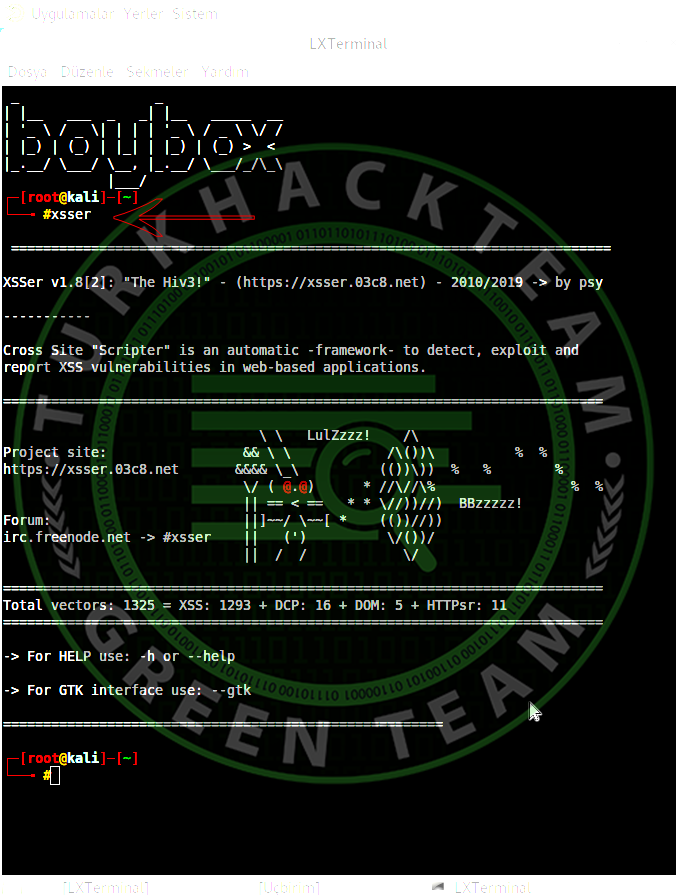
ardından yapmamız gerekn xsser bize neler sunuyor ona bakmamız gerek ve şu komutu yazıyoruz.
xsser -h yada --help
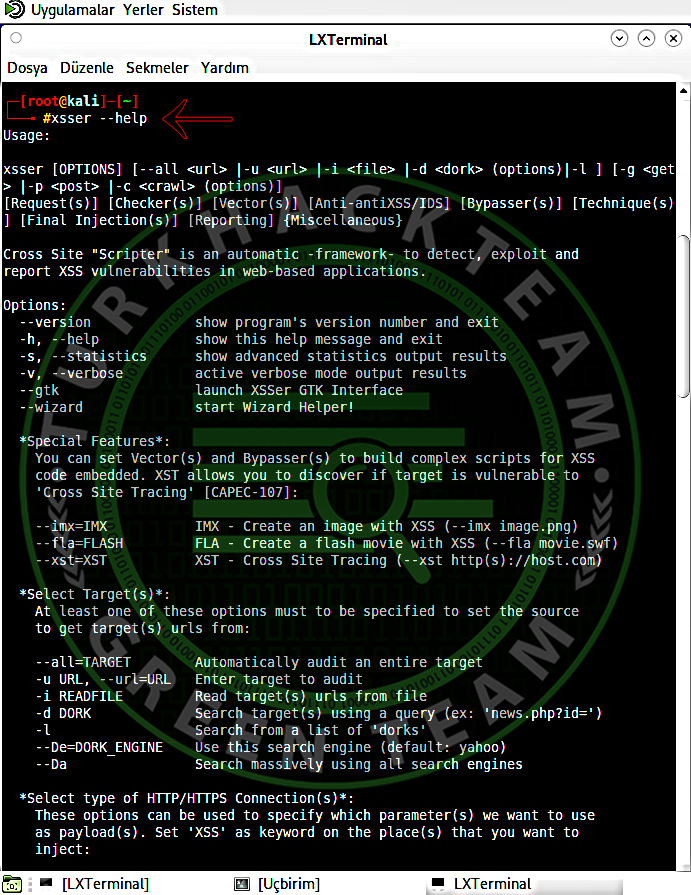
Burada bütün komutlar ve payload'lar mevcuttur.
örnek olması için ben bir sitede bu şekilde denedim fakat denemiş oldugum açık türlerinden açık mevcut olmadıgını NOT-FOUND olarak bana sunmuş bulunmakta.
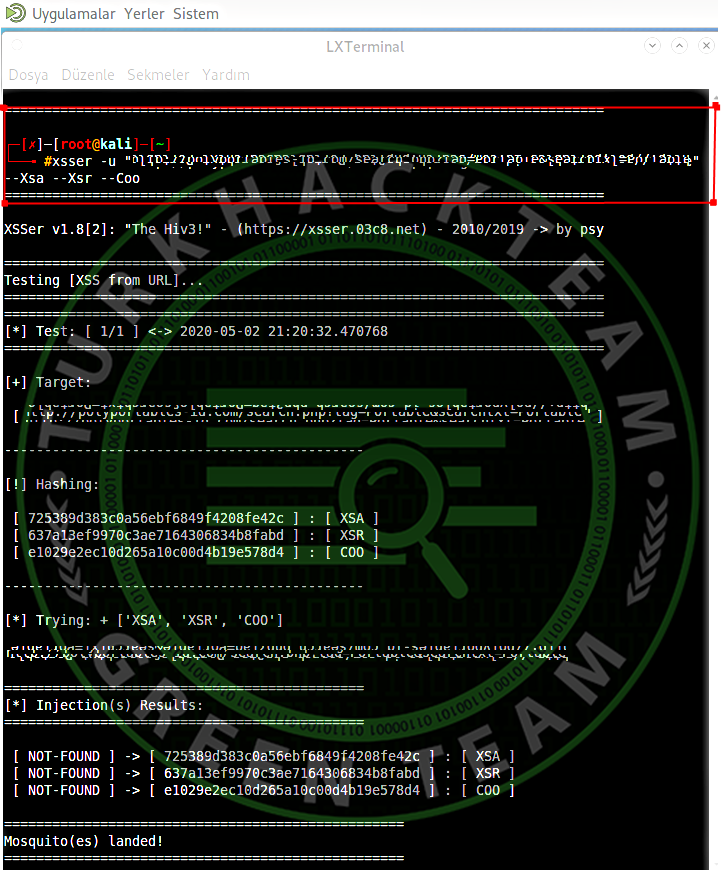
Ben sizler şu komutları bu komutları kullanmamız gerekiyor diye yazmayı çok isterdim fakat herkes sitelerde ne tür açık arataçagını ne tür payload deniyecegini bilemem bu sebepten kullanımı bu kadar kolay olan bir Tool'su sizler kendiniz istediğiniz komutları kullanarak istediğiniz payloadları denerseniz hem daha iyi ögrenmiş olursunuz hemde istediğiniz sonuçları elde etmiş.
Not: Komutumuzda bir çok araçta da olduğu gibi -u parametresiyle tarama yapmak istediğimiz URL adresini belirttik. Tarama başladıktan sonra Payload denemeleri yapıyor bize açığın bulunduğunu ve url attack with ">PAYLOAD... ok şeklinde payload verir.
Merhaba arkadaşlar bu gün sizlerle Web tabanlı uygulamalarda XSS güvenlik açıgını algılamak, kullanmak ve raporlamak için kullanılan otomatik bir Kali Linux Tool'sunu inceliyecegiz.
Belirli filtreleri atlamaya çalışmak için çeşitli seçenekler ve çeşitli özel kod enjeksiyon teknikleri içeren bu XSSER tool'su kali linux'un kendi içerisinde barındırğı ve kurulum ile beraberinde gelmektedir.
Kali Linux terminalimize şu komutu yazıyoruz.
xsser ve karşımıza böyle bir arayüz çıkmaktadır.
ardından yapmamız gerekn xsser bize neler sunuyor ona bakmamız gerek ve şu komutu yazıyoruz.
xsser -h yada --help
Burada bütün komutlar ve payload'lar mevcuttur.
Kod:
root@kali:~# xsser -h
Usage:

xsser [OPTIONS] [-u <url> |-i <file> |-d <dork>] [-g <get> |-p <post> |-c <crawl>] [Request(s)] [Vector(s)] [Bypasser(s)] [Technique(s)] [Final Injection(s)]

Cross Site "Scripter" is an automatic -framework- to detect, exploit and
report XSS vulnerabilities in web-based applications.

Options:
  --version             show program's version number and exit
  -h, --help            show this help message and exit
  -s, --statistics      show advanced statistics output results
  -v, --verbose         active verbose mode output results
  --gtk                 launch XSSer GTK Interface (Wizard included!)

  *Special Features*:
    You can choose Vector(s) and Bypasser(s) to inject code with this
    extra special features:

    --imx=IMX           create a false image with XSS code embedded
    --fla=FLASH         create a false .swf file with XSS code embedded

  *Select Target(s)*:
    At least one of these options has to be specified to set the source to
    get target(s) urls from. You need to choose to run XSSer:

    -u URL, --url=URL   Enter target(s) to audit
    -i READFILE         Read target urls from a file
    -d DORK             Process search engine dork results as target urls
    --De=DORK_ENGINE    Search engine to use for dorking (bing, altavista,
                        yahoo, baidu, yandex, youdao, webcrawler, google, etc.
                        See dork.py file to check for available engines)

  *Select type of HTTP/HTTPS Connection(s)*:
    These options can be used to specify which parameter(s) we want to use
    like payload to inject code.

    -g GETDATA          Enter payload to audit using GET (ex: '/menu.php?q=')
    -p POSTDATA         Enter payload to audit using POST (ex: 'foo=1&bar=')
    -c CRAWLING         Number of urls to crawl on target(s): 1-99999
    --Cw=CRAWLER_WIDTH  Deeping level of crawler: 1-5
    --Cl                Crawl only local target(s) urls (default TRUE)

  *Configure Request(s)*:
    These options can be used to specify how to connect to target(s)
    payload(s). You can choose multiple:

    --cookie=COOKIE     Change your HTTP Cookie header
    --drop-cookie       Ignore Set-Cookie header from response
    --user-agent=AGENT  Change your HTTP User-Agent header (default SPOOFED)
    --referer=REFERER   Use another HTTP Referer header (default NONE)
    --xforw             Set your HTTP X-Forwarded-For with random IP values
    --xclient           Set your HTTP X-Client-IP with random IP values
    --headers=HEADERS   Extra HTTP headers newline separated
    --auth-type=ATYPE   HTTP Authentication type (Basic, Digest, GSS or NTLM)
    --auth-cred=ACRED   HTTP Authentication credentials (name:password)
    --proxy=PROXY       Use proxy server (tor: http://localhost:8118)
    --ignore-proxy      Ignore system default HTTP proxy
    --timeout=TIMEOUT   Select your timeout (default 30)
    --retries=RETRIES   Retries when the connection timeouts (default 1)
    --threads=THREADS   Maximum number of concurrent HTTP requests (default 5)
    --delay=DELAY       Delay in seconds between each HTTP request (default 0)
    --tcp-nodelay       Use the TCP_NODELAY option
    --follow-redirects  XSSer will follow server redirection responses (302)
    --follow-limit=FLI  Set how many times XSSer will follow redirections
                        (default 50)

  *Checker Systems*:
    This options are usefull to know if your target(s) have some filters
    against XSS attacks, to reduce 'false positive' results and to perform
    more advanced tests:

    --no-head           NOT verify the stability of the url (codes: 200|302)
                        with a HEAD pre-check request
    --alive=ISALIVE     set limit of every how much errors XSSer must to
                        verify that target is alive
    --hash              send an unique hash, without vectors, to pre-check if
                        target(s) repeats all content recieved
    --heuristic         launch a heuristic testing to discover which
                        parameters are filtered on target(s) code: ;\/<>"'=
    --checkaturl=ALT    check for a valid XSS response from target(s) at an
                        alternative url. 'blind XSS'
    --checkmethod=ALTM  check responses from target(s) using a different
                        connection type: GET or POST (default: GET)
    --checkatdata=ALD   check responses from target(s) using an alternative
                        payload (default: same than first injection)
    --reverse-check     establish a reverse connection from target(s) to XSSer
                        to certificate that is 100% vulnerable

  *Select Vector(s)*:
    These options can be used to specify a XSS vector source code to
    inject in each payload. Important, if you don't want to try to inject
    a common XSS vector, used by default. Choose only one option:

    --payload=SCRIPT    OWN  - Insert your XSS construction -manually-
    --auto              AUTO - Insert XSSer 'reported' vectors from file
                        (HTML5 vectors included!)

  *Select Bypasser(s)*:
    These options can be used to encode selected vector(s) to try to
    bypass possible anti-XSS filters on target(s) code and possible IPS
    rules, if the target use it. Also, can be combined with other
    techniques to provide encoding:

    --Str               Use method String.FromCharCode()
    --Une               Use Unescape() function
    --Mix               Mix String.FromCharCode() and Unescape()
    --Dec               Use Decimal encoding
    --Hex               Use Hexadecimal encoding
    --Hes               Use Hexadecimal encoding, with semicolons
    --Dwo               Encode vectors IP addresses in DWORD
    --Doo               Encode vectors IP addresses in Octal
    --Cem=CEM           Try -manually- different Character Encoding Mutations
                        (reverse obfuscation: good) -> (ex: 'Mix,Une,Str,Hex')

  *Special Technique(s)*:
    These options can be used to try to inject code using different type
    of XSS techniques. You can choose multiple:

    --Coo               COO - Cross Site Scripting Cookie injection
    --Xsa               XSA - Cross Site Agent Scripting
    --Xsr               XSR - Cross Site Referer Scripting
    --Dcp               DCP - Data Control Protocol injections
    --Dom               DOM - ******** Object Model injections
    --Ind               IND - HTTP Response Splitting Induced code
    --Anchor            ANC - Use Anchor Stealth payloader (DOM shadows!)
    --Phpids            PHP - Exploit PHPIDS bug (0.6.5) to bypass filters

  *Select Final injection(s)*:
    These options can be used to specify the final code to inject in
    vulnerable target(s). Important, if you want to exploit on-the-wild
    your discovered vulnerabilities. Choose only one option:

    --Fp=FINALPAYLOAD   OWN    - Insert your final code to inject -manually-
    --Fr=FINALREMOTE    REMOTE - Insert your final code to inject -remotelly-
    --Doss              DOSs   - XSS Denial of service (server) injection
    --Dos               DOS    - XSS Denial of service (client) injection
    --B64               B64    - Base64 code encoding in **** tag (rfc2397)

  *Special Final injection(s)*:
    These options can be used to execute some 'special' injection(s) in
    vulnerable target(s). You can select multiple and combine with your
    final code (except with DCP code):

    --Onm               ONM - Use onMouseMove() event to inject code
    --Ifr               IFR - Use <iframe> source tag to inject code

  *Miscellaneous*:
    --silent            inhibit console output results
    --update            check for XSSer latest stable version
    --save              output all results directly to template (XSSlist.dat)
    --xml=FILEXML       output 'positives' to aXML file (--xml filename.xml)
    --short=SHORTURLS   display -final code- shortered (tinyurl, is.gd)
    --launch            launch a browser at the end with each XSS discovered
    --tweet             publish each XSS discovered into the 'Grey Swarm!'
    --tweet-tags=TT     add more tags to your XSS discovered publications
                        (default: #xss) - (ex: #xsser #vulnerability)
örnek olması için ben bir sitede bu şekilde denedim fakat denemiş oldugum açık türlerinden açık mevcut olmadıgını NOT-FOUND olarak bana sunmuş bulunmakta.
Ben sizler şu komutları bu komutları kullanmamız gerekiyor diye yazmayı çok isterdim fakat herkes sitelerde ne tür açık arataçagını ne tür payload deniyecegini bilemem bu sebepten kullanımı bu kadar kolay olan bir Tool'su sizler kendiniz istediğiniz komutları kullanarak istediğiniz payloadları denerseniz hem daha iyi ögrenmiş olursunuz hemde istediğiniz sonuçları elde etmiş.
Not: Komutumuzda bir çok araçta da olduğu gibi -u parametresiyle tarama yapmak istediğimiz URL adresini belirttik. Tarama başladıktan sonra Payload denemeleri yapıyor bize açığın bulunduğunu ve url attack with ">PAYLOAD... ok şeklinde payload verir.
Son düzenleme:

