





Herkese hayırlı sabahlar uzun bir aradan sonra araştırmalarım neticesinde C# ile NodeJS script sayesinde mmpeg uygulamasının argüman desteğiyle YouTube platformundan HD video indireceğiz. Geçmişte benzer bir uygulamasını C# üzerinde yapmıştık. Geçmiş konuda yer alan HD video içeriğini burada uygulayacağız ama bu sefer biraz daha geliştirdik sistemlere uyarladık.
Link : turkhackteam.org/konular/youtube-hd-video-indirme-c.2063565/

pip install -U yt-dlp
github.com/BtbN/FFmpeg-Builds/releasesNodeJS kurulumunu yapalım. İlk önce sayfamıza gidelim.
nodejs.org/en/download
Buradan LTS yani uzun süreli destek yazan en son sürümü seçelim bende 24.13.0 LTS görünüyor bu ileride tabi ki değişebilir.
[ GÖRSEL GÖSTERİM ]
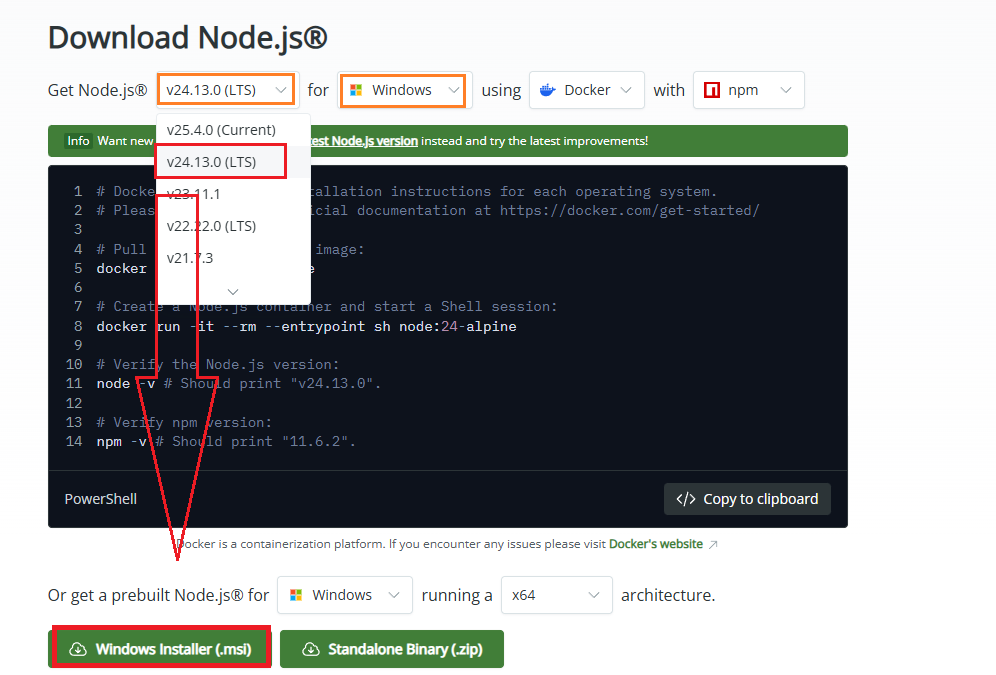
Gelelim NodeJs dosyamıza dwn.js adlı bir dosya oluşturalım & şu kodları girelim.
JavaScript:
const { spawn } = require('child_process');

process.stdout.setEncoding('utf8');
process.stderr.setEncoding('utf8');

function getArg(name) {
    const index = process.argv.indexOf(`--${name}`);
    return index !== -1 ? process.argv[index + 1] : null;
}

const url = getArg('url');

if (!url) {
    console.error("HATA: --url parametresi gerekli");
    process.exit(1);
}

console.log("URL alındı:", url);
console.log("Format: MP4");

const args = [
    '-f',
    'bestvideo[vcodec^=avc]+bestaudio[ext=m4a]/best[ext=mp4]/best',
    '--merge-output-format', 'mp4',
    '-o', '%(title)s.%(ext)s',
    '--windows-filenames',
    '--no-mtime',
    url
];

console.log("yt-dlp başlatılıyor...");

const proc = spawn('yt-dlp', args);

proc.stdout.on('data', data => {
    process.stdout.write(data);
});

proc.stderr.on('data', data => {
    process.stderr.write(data);
});

proc.on('close', code => {
    console.log(code === 0
        ? "\nİndirme tamamlandı"
        : `\nHata oluştu. Kod: ${code}`
    );
    process.exit(code);
});
Şimdi C# kısmına gelelim. Formumuza bir adet Textbox, buton & ListBox ögesi ekleyelim. Zira ListBox bize çıktıyı buton ise operasyonu gerçekleştirmemizi sağlayacak, Textbox ise URL girdimiz olacak.
Ana Kütüphanelerimiz
using System;using System.Collections.Generic;using System.ComponentModel;using System.Data;using System.Diagnostics;using System.Drawing;using System.Linq;using System.Text;using System.Threading.Tasks;using System.Windows.Forms;Buton içerisine gireceğimiz kod satırları;
C#:
ProcessStartInfo psi = new ProcessStartInfo
{
    FileName = @"NodeJS_Kurulu_Olduğu_Dizin\nodejs\node.exe",
    Arguments = $"dwn.js --url \"{textBox1.Text}\"",
    WorkingDirectory = @"dwn.js_Adlı_Dosyanızın_Olduğu_Dizin\youtube-video-indir",
    UseShellExecute = false,
    RedirectStandardOutput = true,
    RedirectStandardError = true,
    StandardOutputEncoding = Encoding.UTF8,
    StandardErrorEncoding = Encoding.UTF8,
    CreateNoWindow = true
};

Process p = new Process();
p.StartInfo = psi;

p.OutputDataReceived += (s, output) =>
{
    if (!string.IsNullOrEmpty(output.Data))
    {
        Invoke(new Action(() =>
            listBox1.Items.Add(output.Data)
        ));
    }
};

p.ErrorDataReceived += (s, err) =>
{
    if (!string.IsNullOrEmpty(err.Data))
    {
        Invoke(new Action(() =>
            listBox1.Items.Add("HATA: " + err.Data)
        ));
    }
};

p.Start();
p.BeginOutputReadLine();
p.BeginErrorReadLine();Her şey tamam ise deneyelim bakalım çalışıyor mu? Şahsen rastgele bir form açıp kodları girelim ve rastgele bir YouTube videosu URL 'si yapıştıralım.
[ GÖRSEL GÖSTERİM ]
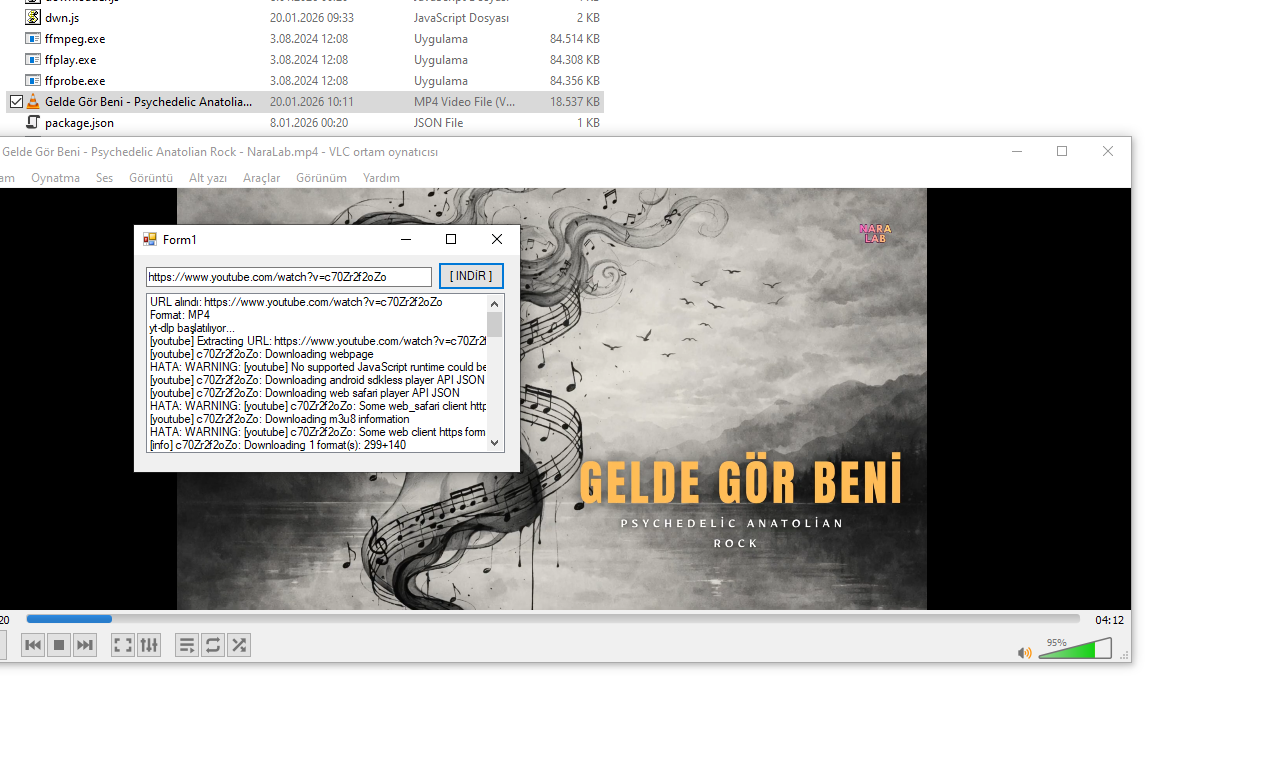
~ Görüldüğü üzere videomuz indi. Teşekkürler. ~
~ Görüldüğü üzere videomuz indi. Teşekkürler. ~